Manage subscriptions
Company Administrators and end users use Manage Subscriptions to view and manage the company's subscriptions. The experience replaces the previous orders UI with a subscription list and a full-page detail view.
📝 Note: The experience is enabled by default for new self-serve marketplaces. On an existing marketplace, contact your AppDirect technical representative to request it. A few tasks still open the previous experience.
Open the subscription list
- Go to Account > Subscriptions. The Manage Subscriptions page opens.
Click Learn more on the banner for information about the experience. Click Revert to Classic View to return to the previous orders UI.
Review subscription counts
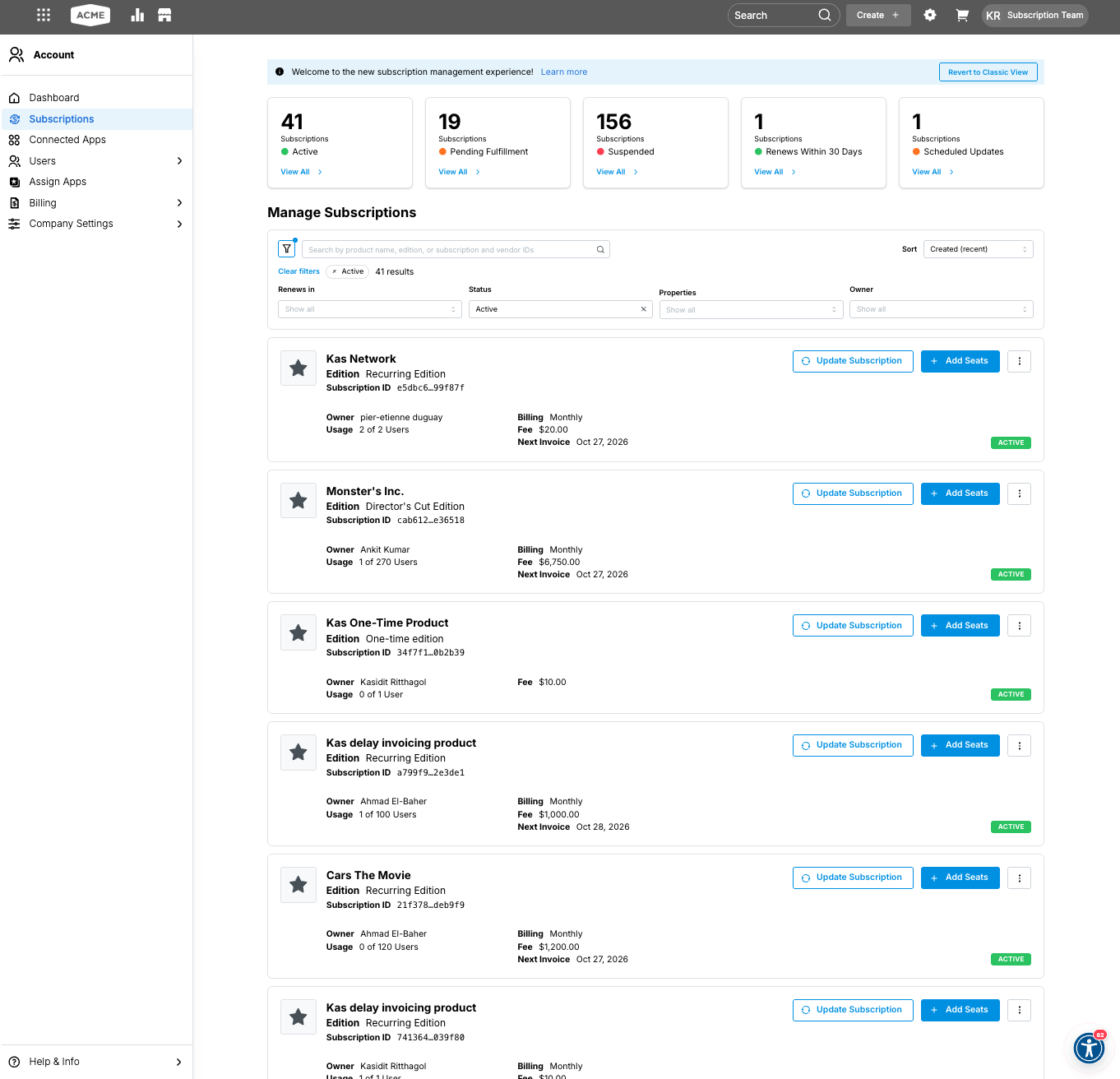
Summary cards at the top of the page count subscriptions in each group. Click View All on a card to filter the list to that group. Click Clear filters to remove the filter.
| Card | Subscriptions included |
|---|---|
| Active | Subscriptions currently in service. |
| Pending Fulfillment | Subscriptions waiting for fulfillment to finish. |
| Suspended | Subscriptions that are temporarily deactivated. |
| Renews Within 30 Days | Subscriptions with a renewal in the next 30 days. |
| Scheduled Updates | Subscriptions that have a pending scheduled update. |
For status definitions, see Order and subscription statuses.
Find a subscription
- Search by product name, edition, subscription ID, or vendor ID.
- Filter by Renews in, Status, Properties, or Owner. Applied filters appear as chips, with the number of matching subscriptions.
- Sort the list. The default sort is Created (recent).
Read a subscription card
Each card represents one subscription.
| Field | Description |
|---|---|
| Product and edition | Product name and the subscribed edition. |
| Subscription ID | Identifier for the subscription. |
| Owner | User responsible for the subscription. |
| Usage | Units in use and units purchased. The label uses the edition's unit type, such as users. |
| Billing | Billing frequency. Shown for recurring subscriptions. |
| Fee | Current charge. |
| Next Invoice | Date of the next invoice. Shown for recurring subscriptions. |
| Status | Current subscription status, such as Active. |
From the card:
- Click Update Subscription to change the edition, quantity, or other subscription terms. See Update subscriptions v2.
- Click Add Seats to open the quantity update for the current edition.
- Open the options menu to view payments or transfer ownership. Cancel Scheduled Update appears in this menu when a pending update can be withdrawn. See Cancel a scheduled update.
Open subscription details
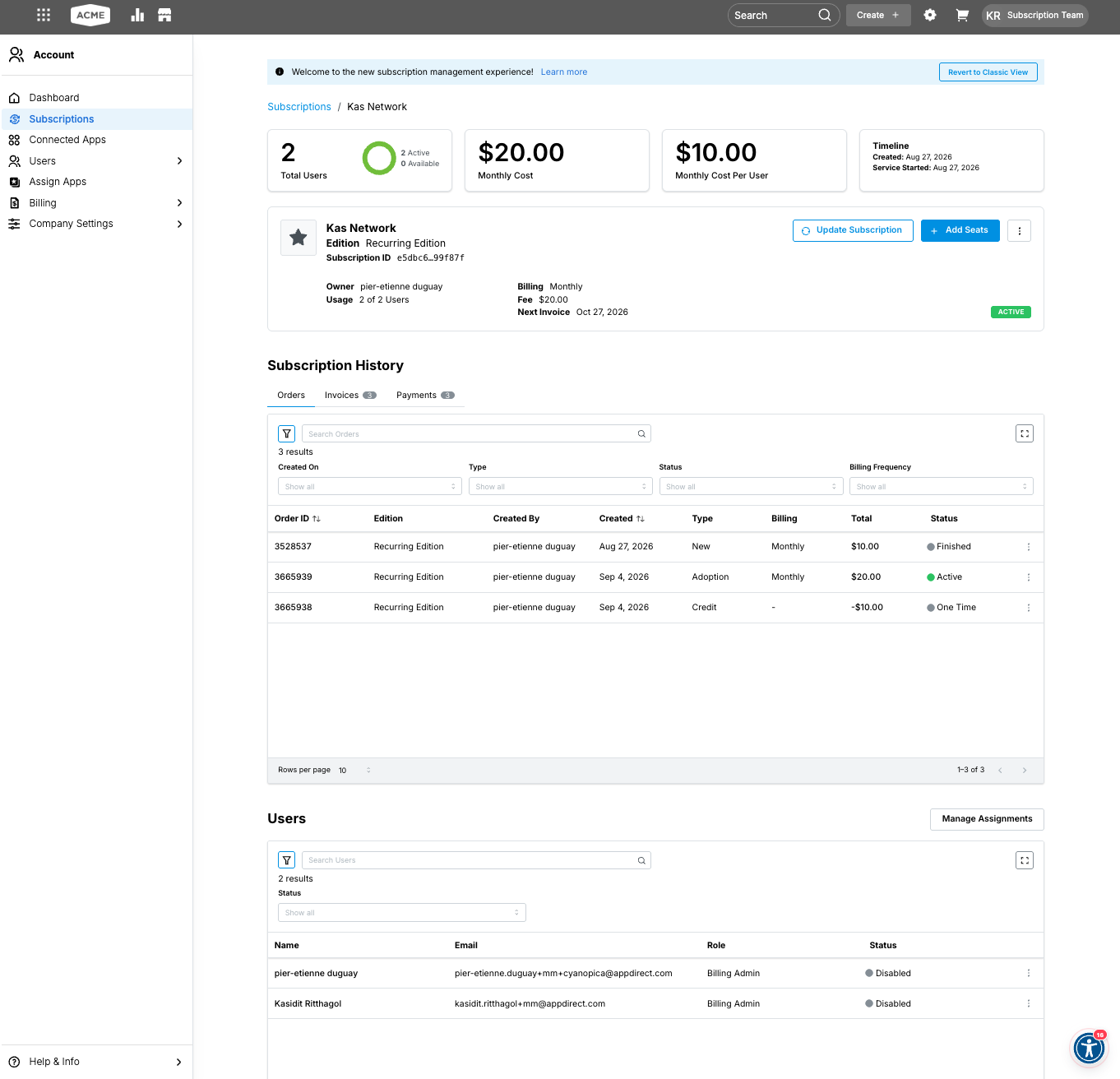
Click the product name on a card. The detail page opens. The breadcrumb shows Subscriptions, followed by the product name.
The summary reflects the edition's unit type and billing frequency.
| Summary | Description |
|---|---|
| Unit total | Purchased units. A per-user edition shows Total Users. |
| Active and available | Units in use and units still available. |
| Recurring cost | Charge for the billing period. A monthly subscription shows Monthly Cost. |
| Cost per unit | Charge for each unit. A monthly per-user edition shows Monthly Cost Per User. |
| Timeline | Created date and Service Started date. |
The same subscription card and actions appear under the summary.
Review subscription history
Subscription History lists the orders, invoices, and payments for the subscription. One subscription can include several orders, such as the original purchase and later changes.
On the Orders tab, search for an order or filter by Created On, Type, Status, or Billing Frequency. Rows per page sets how many orders are listed.
| Column | Description |
|---|---|
| Order ID | Identifier for the order. |
| Edition | Edition on the order. |
| Created By | User who created the order. |
| Created | Date the order was created. |
| Type | Order type, such as New, Adoption, or Credit. |
| Billing | Billing frequency. A dash means the order has no billing frequency. |
| Total | Order amount. A credit shows a negative amount. |
| Status | Order status, such as Active, Finished, or One Time. |
The Invoices and Payments tabs list the billing records for the subscription.
Review assigned users
The Users section lists the users assigned to the subscription. Search for a user, or filter by Status.
| Column | Description |
|---|---|
| Name | User's name. |
| User's email address. | |
| Role | User's role in the company. |
| Status | User's status, such as Disabled. |
Click Manage Assignments to assign or unassign users. For the assignment steps, see Assign applications to users.
Cancel a scheduled update
Cancel Scheduled Update removes the pending update and leaves an active subscription on its current terms. Pending proration, draft invoices, and pending credits tied to the update are voided. An update that has already been applied cannot be cancelled this way.
On the Manage Subscriptions page, only Company Administrators and end users can select Cancel Scheduled Update. Marketplace Managers, Developers, Resellers, and Sales Support Representatives use the classic experience or assisted sales.
The action applies to an update scheduled to take effect immediately, on a future date, or at the end of the contract, and to a new purchase scheduled for a future date. Cancelling an end-of-contract update means the renewal uses the current terms. The action is separate from Cancel subscriptions. Each subscription can have one pending scheduled update. In the Marketplace Manager console and assisted sales flows, you can enter an optional reason.
If the subscription has not started and the scheduled purchase is its only order, cancelling the scheduled update also cancels the subscription. The confirmation explains that no active orders remain. Click Keep Scheduled Update to close the confirmation, or Cancel Scheduled Update to continue.
📝 Note: Cancel Scheduled Update is not enabled by default. Contact your AppDirect technical representative to request it. No marketplace setting is required after it is enabled. The action appears only when a pending scheduled update can still be withdrawn. It does not appear for a scheduled cancellation, a price change, a discount expiry, or a downgrade scheduled for the next billing cycle. Withdraw a scheduled cancellation with Revoke Cancellation on the Scheduled Changes banner. On the classic experience, see Withdraw scheduled subscription cancellations. If the cancellation is no longer allowed, or a vendor rule blocks it, the page shows the reason.
| Experience | Who can use it | Where Cancel Scheduled Update appears |
|---|---|---|
| Manage Subscriptions detail page | Company Administrators and end users | On the Scheduled Changes banner, next to View Details. |
| Manage Subscriptions listing | Company Administrators and end users | In the options menu, between View Payments and Transfer Ownership. |
| Classic app detail page | Company Administrators and end users | In the options menu, above Cancel Subscription. |
| Classic Order History | Marketplace Managers, Resellers, and Sales Support Representatives | On the pending-change banner in assisted sales. |
| Scheduled Update modal | Marketplace Managers, Developers, and Resellers | Next to Override Scheduled Update. |
To cancel a scheduled update from Manage Subscriptions
- Go to Account > Subscriptions.
- Do one of the following:
- On the listing, open the options menu for the subscription and click Cancel Scheduled Update.
- Open the subscription and click Cancel Scheduled Update on the Scheduled Changes banner.
- Confirm the cancellation. A confirmation message appears, and the scheduled update is removed.
Was this page helpful?
Tell us more…
Help us improve our content. Responses are anonymous.
Thanks
We appreciate your feedback!