Update subscriptions v2
Subscription Update v2 is the recommended subscription change experience for both self-serve customers and assisted sales (marketplace managers, resellers, and sales support representatives). It is built on the same commerce foundations as modern checkout and quotes: you can change editions, quantities, contract timing, discounts (where permitted), and, when products are configured for it, move units between subscriptions using unit transfer.
Subscription Update v1 is deprecated with end of support planned for the end of 2026. New projects and migrations should use Subscription Update v2. Legacy steps are still documented in Update subscriptions.
Subscription management compared with subscription update
| Area | What customers do there | Typical UI |
|---|---|---|
| Subscription management | View the subscription relationship: status, identifiers, order history, invoices, payments, assignments, ownership | Manage subscriptions (listing and detail pages where enabled) |
| Subscription update (this topic) | Perform commerce changes: seats, edition, add-ons, schedule future states, unit transfer, quotes for approval | Edition selector and checkout-style update (self-serve), or quote / opportunity workspace (assisted) |
For subscription and order labels, and for multiple orders on one subscription, see Manage subscriptions.
Self-serve flow (company administrators and customer admins)
Self-serve update is intentionally aligned with checkout: customers choose a product edition, then work through a checkout-style page for quantities, custom attributes, payment, and scheduling.
Open Subscription Update v2
- Go to Manage > Account > Applications (or Manage Apps, depending on your theme). The applications page opens.
- Locate the product subscription to change and click Update Subscription.
The next screen depends on product configuration (see Unit transfer):
- If the product supports unit transfer, you can choose a regular update or a full / partial unit transfer.
- If the product does not support unit transfer, you start on the edition selector page (see below).
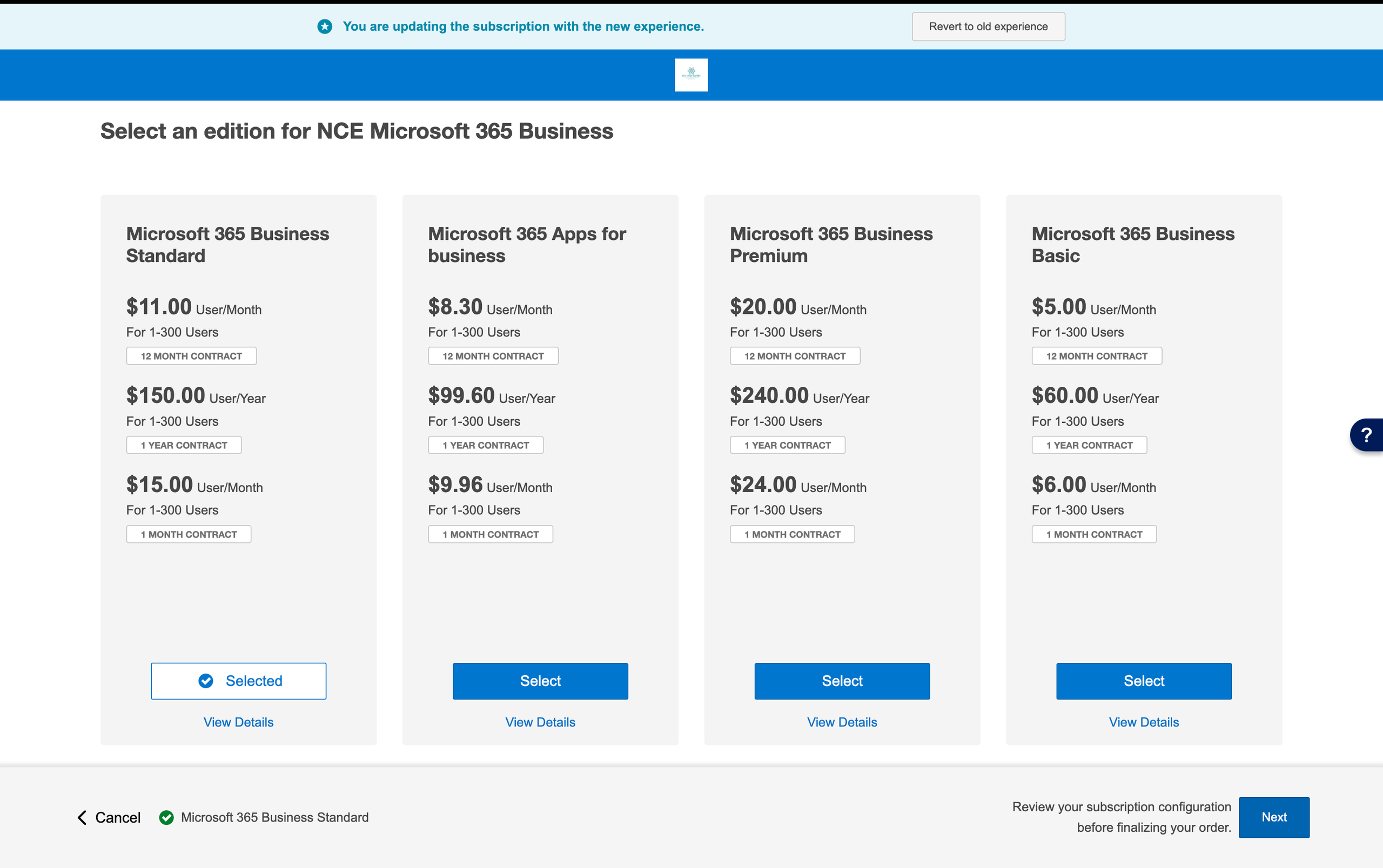
Edition selector page
The edition selector lists the editions available for the product. You can:
- Move to a different edition (upgrade or downgrade path permitted by catalog and contract rules), or
- Stay on the current edition if you only need to change quantities or attributes.
Click Next to open the checkout-style update page.
Checkout-style update page
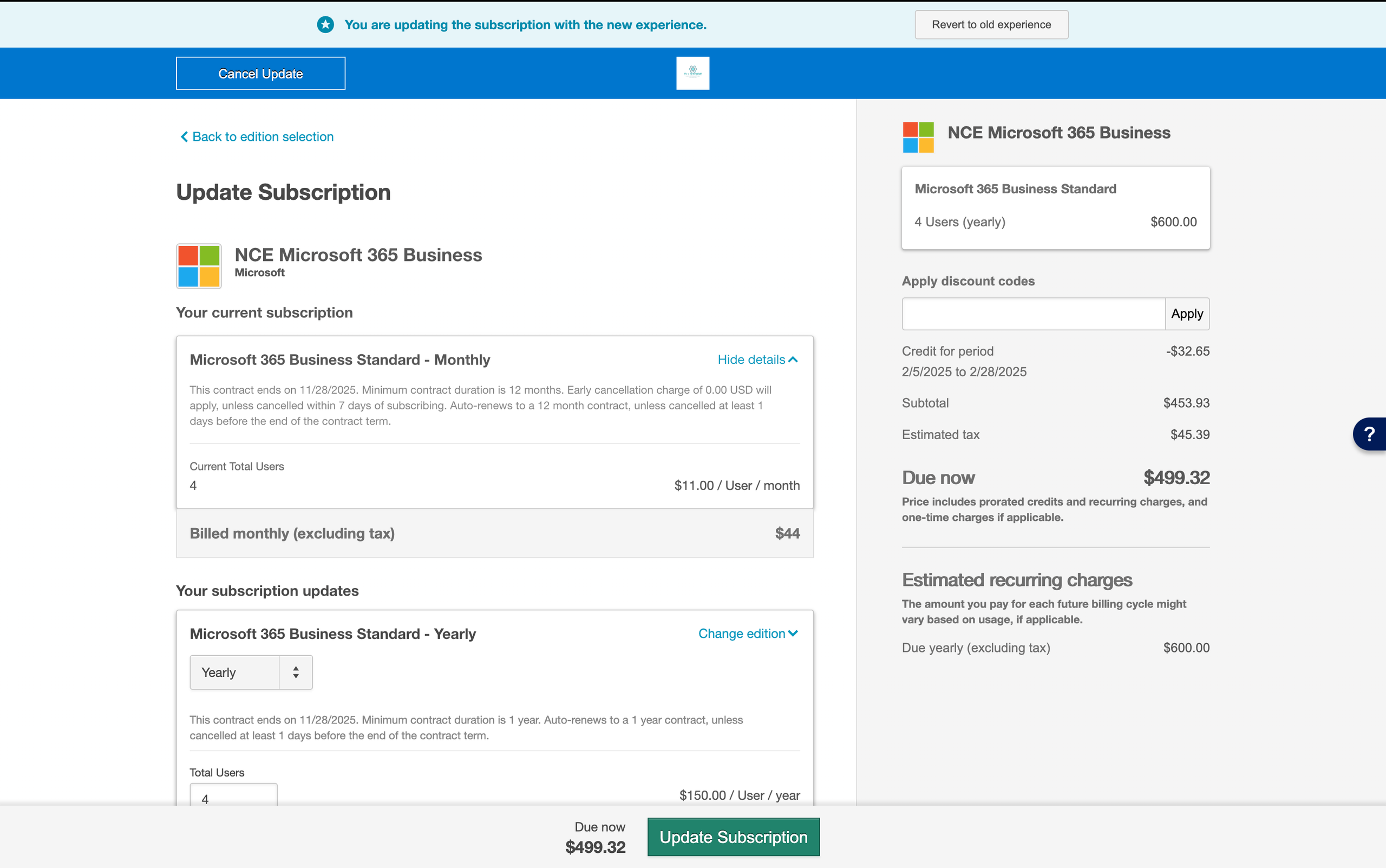
On the update checkout page you can:
-
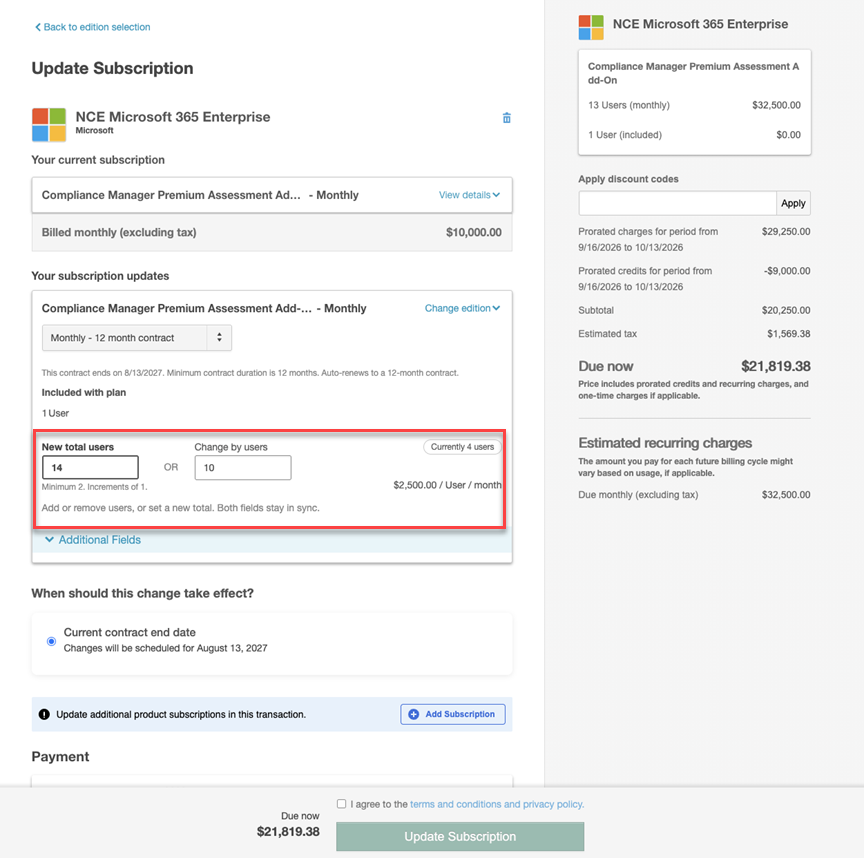
Change included units / seat counts. In the self-serve flow, each subscription update row can show the current quantity and two synchronized fields so you can express the same change either way:
- New total {unit} — Enter the revised total after the change. For example, if there are currently 4 users and you want 10, enter
10. - Change by {unit} — Enter how many units to add or remove. For example, enter
6to add 6 users, or-2to remove 2. The placeholder uses examples such ase.g. 5 or -3(a leading plus sign is not required). - A Currently N {unit} indicator keeps the starting quantity visible even after you edit either field. Both fields stay in sync, and labels use the product’s unit type with singular or plural forms as appropriate (for example, User / Users).
❗ Important: The refined quantity labels (New total, Change by, and Currently) are currently in Early Availability (EA) for self-serve Subscription Update v2. They do not change Assisted Sales flows or API contracts. Contact your AppDirect technical representative to request access. For more information on feature status, see Product lifecycle phases.
- New total {unit} — Enter the revised total after the change. For example, if there are currently 4 users and you want 10, enter
-
Review pricing, taxes, and proration according to marketplace and product rules. In the self-serve flow, the right-pane Pricing summary for tiered pricing plans collapses the tier list by default so discounts, prorated charges and credits, tax, and the amount due stay easier to see:
- Collapsed view shows a single summary row with quantity, weighted-average per-unit price, and total cost.
- Expand the plan header to view the full tier breakdown. The tier that applies to the current quantity is highlighted.
- Expanded or collapsed state persists for the current session on that subscription. Flat-price (non-tiered) plans continue to render without a collapsible header. Assisted Sales flows and API contracts are unchanged.
❗ Important: The collapsible tier breakdown on the self-serve pricing summary is currently in Early Availability (EA). For more information on feature status, see Product lifecycle phases.
-
Provide custom attributes when the product defines them.
-
Choose when changes take effect using schedule change options (see Schedule changes).
Add seats shortcut
If you only need to change seat quantity on the current edition, use Add seats (or equivalent) where available. That path skips the edition selector and opens the checkout-style update so you can adjust quantities faster.
Multi-subscription updates (self-serve)
When enabled, you can add another subscription to the same session from the subscription list; you still configure each subscription/edition in turn. Requires Manage subscriptions. Confirm limits with your representative.
Assisted sales flow (quotes / opportunities)
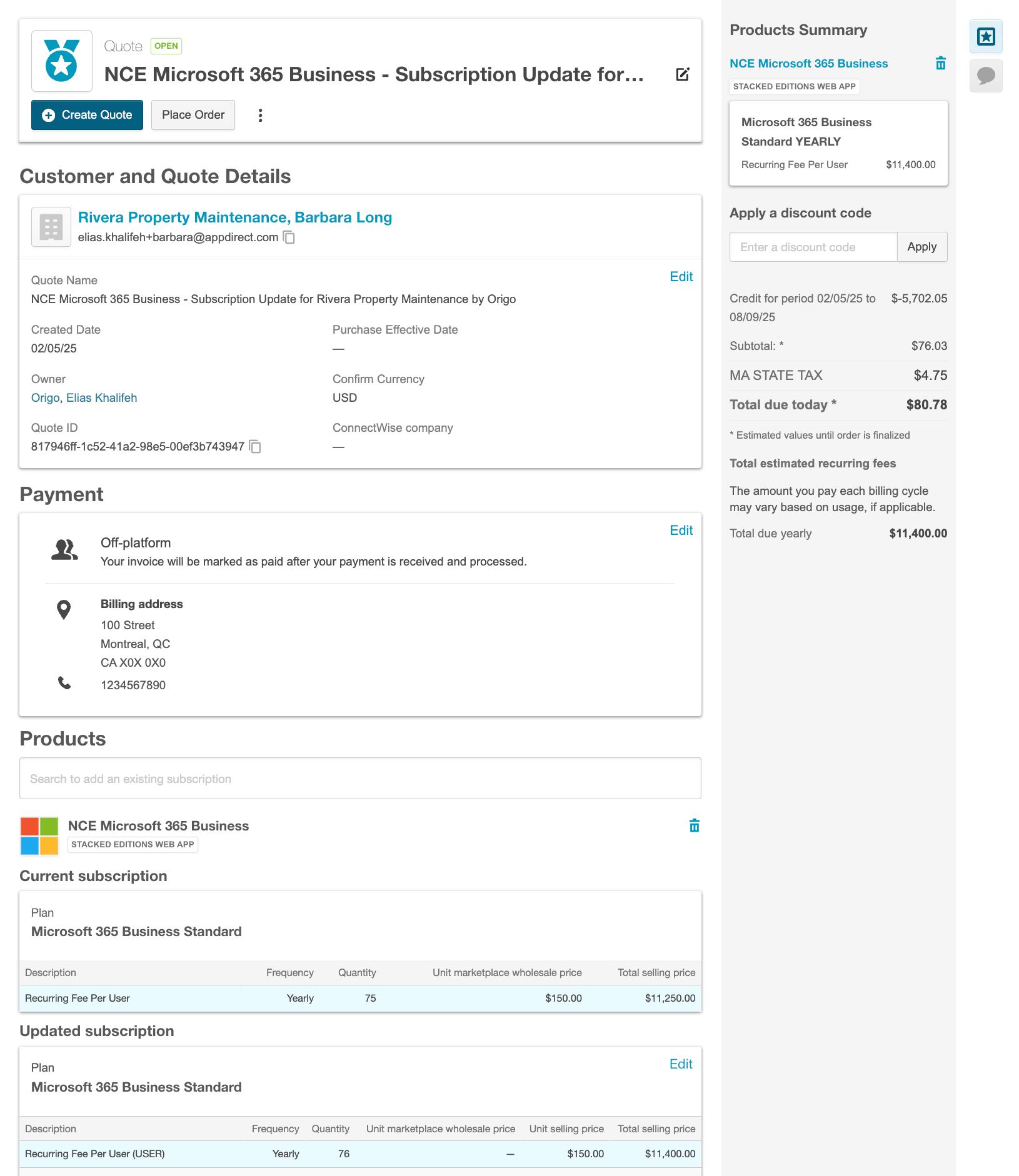
Assisted users work from the customer’s subscription in Operations or Orders (labels vary by marketplace). The legacy strip at the bottom of the page is Update v1; choose Try new experience for Update v2.
How assisted update differs from self-serve
- The assisted flow reuses the quote workspace (internally an opportunity). You are editing line items, pricing, and dates in the same pattern as a new purchase quote.
- There is no separate edition selector page: you choose the plan / edition and quantities directly in the quote layout, including markup / markdown and custom pricing where your role allows it.
- You can create or send a quote for customer approval, schedule changes, and use date controls aligned with the contract (see Schedule changes).
Finalize the quote according to your marketplace rules. Role permissions such as Finalize subscription update opportunities are described in Configure opportunity role sets.
Microsoft NCE and connector-specific behavior
NCE full and partial upgrades use self-serve and assisted flows in v2; some steps come from Microsoft connector APIs (for example eligibility). If you migrate from Update v1 “Microsoft upgrades” UI, confirm the current path with your AppDirect technical representative and Microsoft connector documentation.
Adobe future pricing tiers
❗ Important: This capability is currently in Early Availability (EA). Contact your AppDirect technical representative to enable it. No marketplace setting is required after AppDirect enables the feature. For more information on feature status, see Product lifecycle phases.
When you update an Adobe subscription in Subscription Update v2, the subscription update screen can display a future tiers list. You can view and select higher-level subscription options that were previously hidden during the modification flow. This applies to both self-serve and opportunity (assisted sales) workflows.
The marketplace must offer Adobe products that expose future pricing tiers through Adobe’s API.
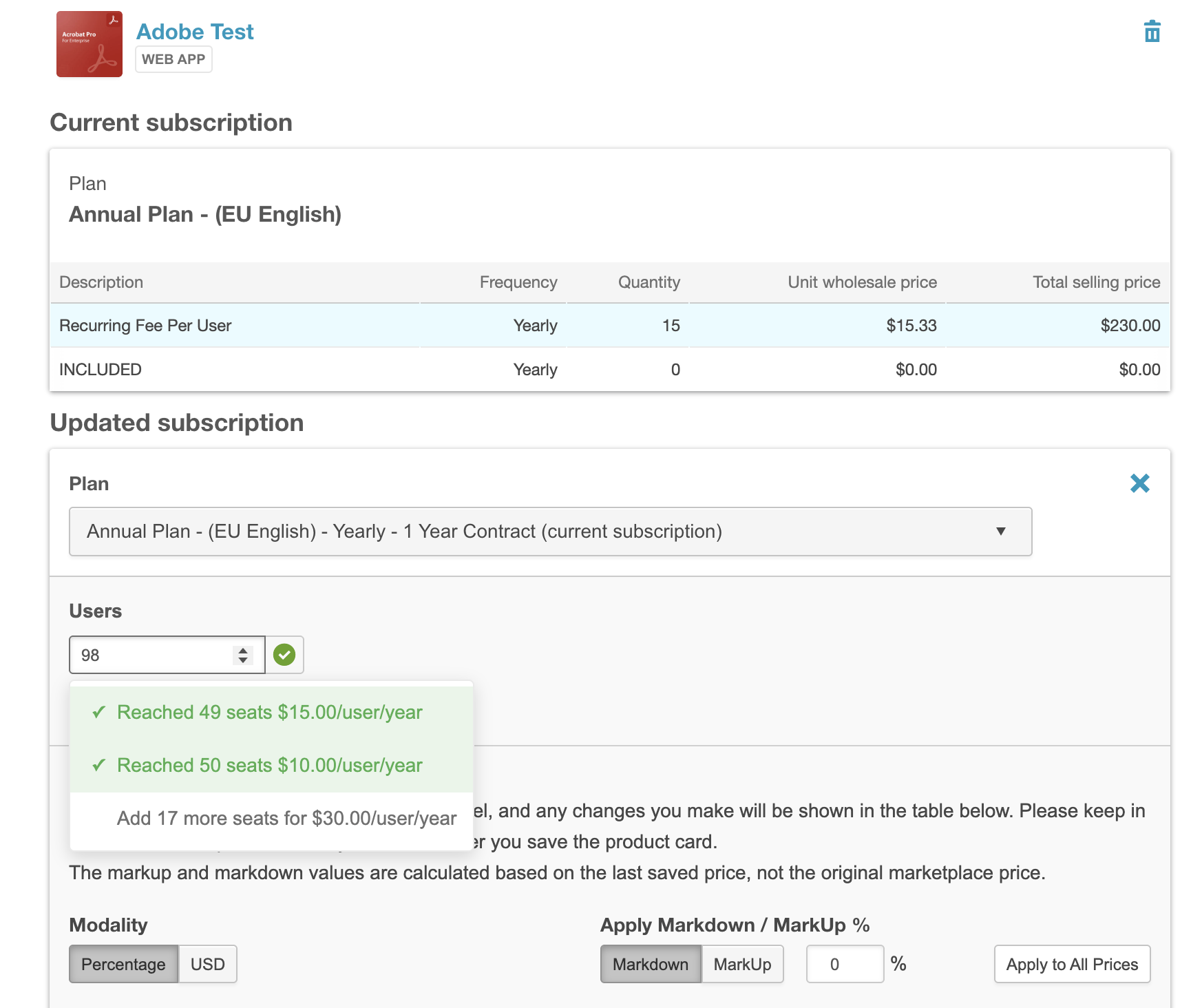
For the same capability during purchase, see Adobe products and future pricing tiers in Checkout V2.
Unit transfer
Unit transfer lets customers move a quantity of units (seats, packs, or other unit types defined on the edition) from a source subscription to a target product/edition. Typical cases include partial moves (for example, move 5 of 10 seats from a base edition to a higher edition) or full moves (all units).
When unit transfer is available
Unit transfer options appear only when the catalog is configured to allow it for that edition:
- This edition supports unit transfers: Enables transfer from this edition.
- This edition supports eligibility checks: When enabled, the platform calls your configured eligibility integration so the ISV can return the allowed target editions or products instead of exposing every theoretical combination.
These settings can be maintained in the product catalog UI and, for bulk work, via Product Uploader fields documented in New fields added to Product Edition section in Product Uploader.
If unit transfer is not supported for the edition, the customer receives a regular update flow only.
Source and target (“losing” and “gaining”) subscriptions
- Source (losing) subscription: The subscription you transfer units from. Quantity decreases here (unless the business rules cancel the subscription after a full transfer; follow product-specific guidance).
- Target (gaining) subscription: The subscription that receives the additional units.
You must transfer between compatible unit types (for example, users to users). The UI enforces compatibility.
Existing subscription vs new subscription
If the customer already owns the target product/edition, the flow can add seats to that existing subscription. If they do not, you can create a new subscription for the target. Pricing, proration, and invoices are recalculated for the selected option.
Integrations and eligibility
For generic (non-packaged) integrations, developers can configure endpoints the platform calls to determine which targets are eligible for a transfer when eligibility checks are enabled. Configure URLs on the product Integration pages alongside your other subscription endpoints. Exact field labels appear in your current product build; coordinate with your integration developer for payload and response formats.
Adobe and Microsoft can enforce extra rules (for example Adobe switch paths). See Adobe anytime upgrades in the Marketplace when that integration applies.
User assignments
When you reduce units on a source subscription, users may still be assigned to seats you are removing. The UI may prompt you to resolve assignments before the change completes. Follow on-screen guidance and your organization’s access-management policies.
Invoices
Transfers generate billing activity consistent with a new commerce operation. You may see parent and child invoices that explain what changed on the source and target subscriptions. Details appear in your Billing or Invoices areas.
Schedule changes (effective dates and contracts)
Depending on contract and marketplace settings, you can often schedule whether a change is:
- Effective immediately
- Effective on a specific date
- Effective at the end of the current contract term (sometimes described as end of subscription period or renewal alignment)
Contract and edition restriction settings may block mid-term changes and force end-of-term scheduling. See Edition, unit, and contract restrictions.
Only one scheduled change at a time
For a given subscription, only one active scheduled change is stored at a time. If you submit a new scheduled change, it replaces the previous one. There is no picker to keep multiple competing future changes. To withdraw a pending update and keep the current terms, see Cancel a scheduled update.
Discounts and proration
- Auto-applied or flexible discount codes may need to be re-applied because an update is a new commerce operation; behavior is product-specific.
- Negotiated pricing offers with Percentage, Fixed amount, or Flat price discount types can apply during subscription updates and contract renewals.
- Proration, credits, taxes, and payment methods follow the same marketplace rules as checkout and quotes.
Enterprise operations (impersonation / assisted from Operations)
If your deployment uses Operations > Users for enterprise administration:
- Navigate Operations > Users and open the user record.
- Open the relevant subscription or order (terminology may vary).
- On Update Subscription, click Try new experience (Update v2). A quote-style workspace opens.
- Update products, seats, edition/plan, payment, and date controls as permitted.
- (Optional) Use Create Quote and Request customer approval when your process requires customer sign-off.
- Save to submit the change through your normal approval and provisioning flow.
Supported scope (high level)
Subscription Update v2 supports the common web application integration types and recurring/tiered revenue models used in cloud marketplaces. Some categories (for example, physical goods) are not supported in the update commerce flow. A detailed matrix was published with the original announcement; refer to Subscription Update v2 and confirm with your representative if your product type is borderline.
APIs and automation
Subscription Update v2 is automated primarily through the AppDirect GraphQL API. Browse the live schema in the GraphQL reference, then use Subscription Update v2: UI vs API coverage for the billing, checkout, and reseller experience operations that correspond to self-serve updates, previews, unit transfer, and quote-based assisted updates. Confirm preview vs GA fields with your technical representative and release notes.
Related topics
Was this page helpful?
Tell us more…
Help us improve our content. Responses are anonymous.
Thanks
We appreciate your feedback!