Account dashboard (Company Administrators)
As a Company Administrator, you use the Dashboard under Manage > Account as your account home page. The dashboard shows widgets with subscriptions, billing shortcuts, announcements, and other information for your company.
The dashboard experience matches the layout used for other marketplace roles. A banner on the dashboard opens a what-you-see-is-what-you-get (WYSIWYG) editor so you can choose which widgets appear and how the page is arranged for Company Administrators in your company.
Widgets: Hover over a widget to see whether you can edit or rearrange it.
| Widget | Editable? |
|---|---|
| Broadcast (Announcements) | Yes |
| Metrics | No |
| Rich Media | Yes |
| Quick Links | Yes |
| Knowledge Center | Yes |
| Team Management | No |
| Recent Events | No |
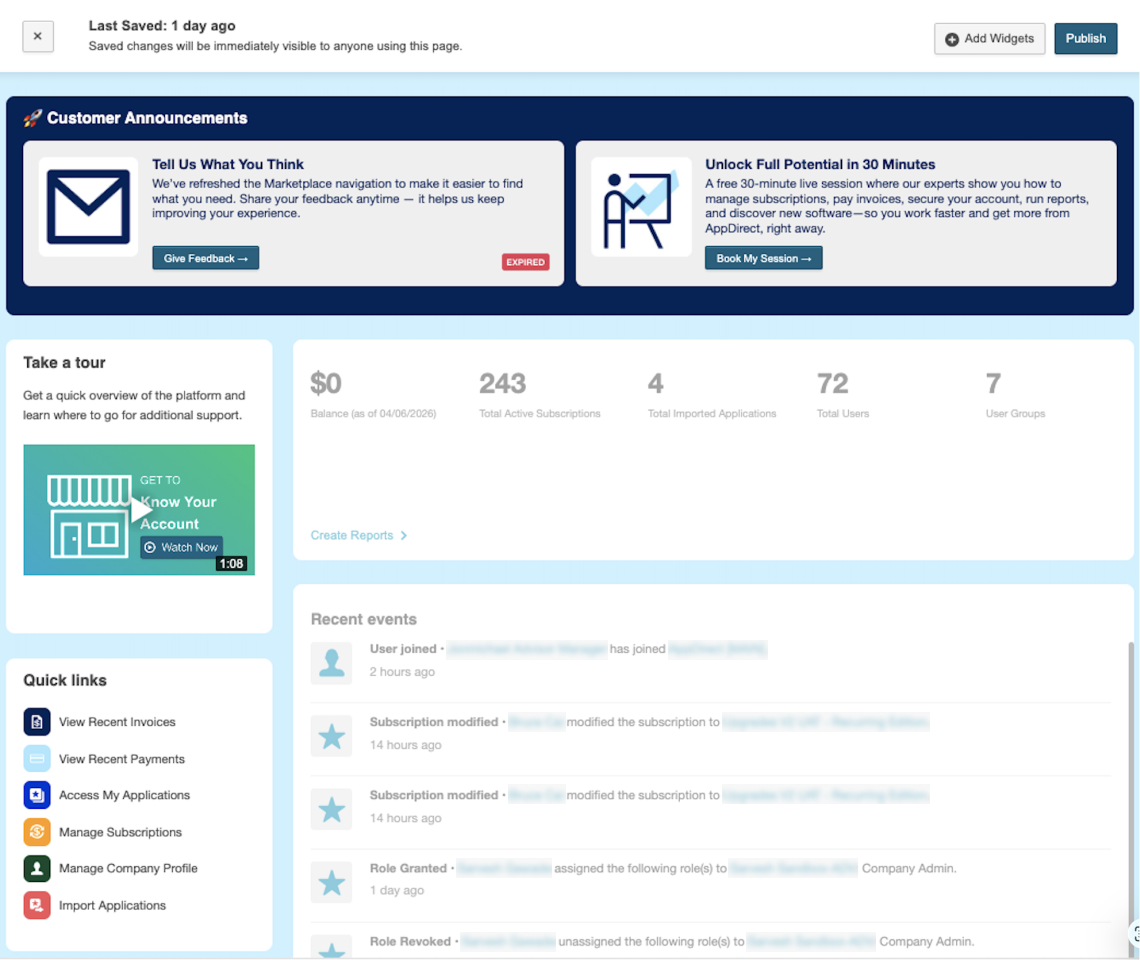
Key metrics such as active subscriptions and account balance can appear on the dashboard so you can review status at a glance.
📝 Note: Which widgets and actions are available can depend on your marketplace configuration. If you do not see the dashboard, the customization banner, or specific widgets, contact your AppDirect technical representative.
Was this page helpful?
Tell us more…
Help us improve our content. Responses are anonymous.
Thanks
We appreciate your feedback!