Manage auto-renewal from the assisted sales order modal
Marketplace Managers, Sales Support Representatives, Reseller Managers, and Resellers can turn auto-renewal on or off for a subscription from the assisted sales order modal. This removes the need to impersonate an end user and open the subscription list to re-enable auto-renewal.
The Re-enable Autorenew supports late renewal and other assisted sales workflows for auto-renewable subscriptions.
📝 Note: This documentation page may refer to Manage > Marketplace in navigation steps. If the Manage option is not available in your navigation, click the grid icon on the top-left corner of your header and click Marketplace.
❗ Important: This feature is currently in Early Availability (EA) status. Contact your AppDirect technical representative to request it. No marketplace setting is required after AppDirect enables the feature.
Before you begin
The Re-enable Autorenew option appears only when all of the following are true:
- You have one of the authorized roles: Marketplace Manager, Sales Support Representative, Reseller Manager, or Reseller.
- The subscription is scheduled to end at the end of the contract.
- The product edition is not configured with auto-renewable set to false.
📝 Note: The option is available in the assisted sales order modal only. It does not appear in the Opportunities workspace or in the self-serve view. Users without an authorized role do not see the setting.
Turn auto-renewal back on
-
Go to one of the following locations:
- Manage > Marketplace > Dashboard > Billing | Orders
- Manage > Marketplace > Dashboard > Home | Users > user name, then scroll to the Orders table
- Manage > Marketplace > Dashboard > Home | Companies > company name, then click the Billing tab
-
Click the subscription or order. The order details dialog (order modal) opens.
-
When auto-renewal is off, click Re-enable Autorenew to turn it back on.
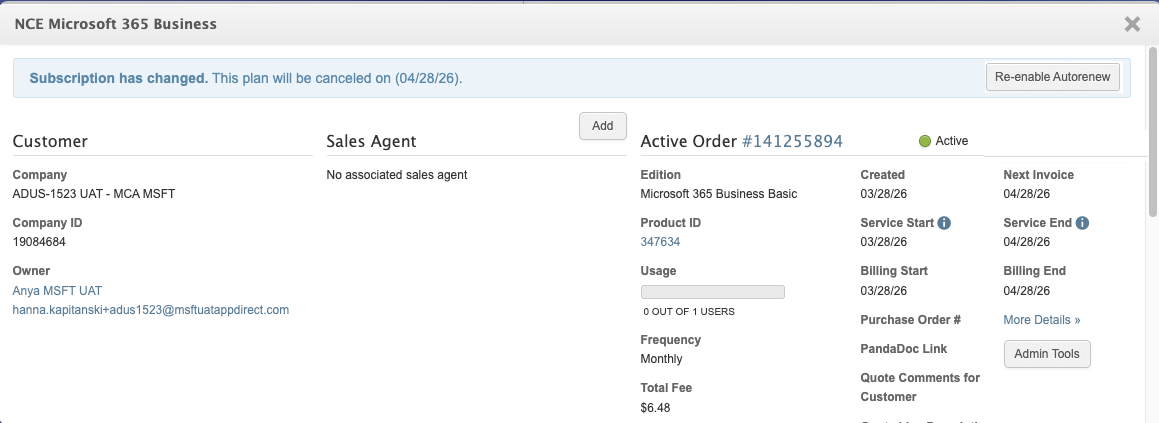
The subscription’s auto-renewal status is updated without impersonating the customer.
Related topics
Was this page helpful?
Tell us more…
Help us improve our content. Responses are anonymous.
Thanks
We appreciate your feedback!