NCM catalog utilities
Only AppDirect can enable NCM catalog utilities. Contact your AppDirect technical representative to request them.
Network Catalog Managers can use Import Catalog, Sample Catalog, and Transfer Products directly in the Network Catalog Manager portal. These utilities were previously available only through Superuser Support.
📝 Note: Network Catalog Manager is available only to customers with a Network edition marketplace. Sample Catalog is further restricted to AppDirect base partner marketplaces.
Prerequisites
NCM catalog utilities require the following:
- The Network Catalog Management marketplace capability is enabled on the partner.
- The user holds the Network Catalog Manager role.
Superuser and Super Support access to these tools is unchanged. Superuser access will be deprecated in a later release.
Access catalog utilities
- Go to Manage > Network > Products.
- In the left navigation pane, select one of the following options:
| Utility | Description | Availability |
|---|---|---|
| Import Catalog | Manage imported applications and their integration status | Network Catalog Managers with the required role and marketplace capability |
| Sample Catalog | Access sample catalog applications | AppDirect base partner only |
| Transfer Products | Transfer products between marketplaces in your network hierarchy | Scoped to the Network Catalog Manager's owned network hierarchy |
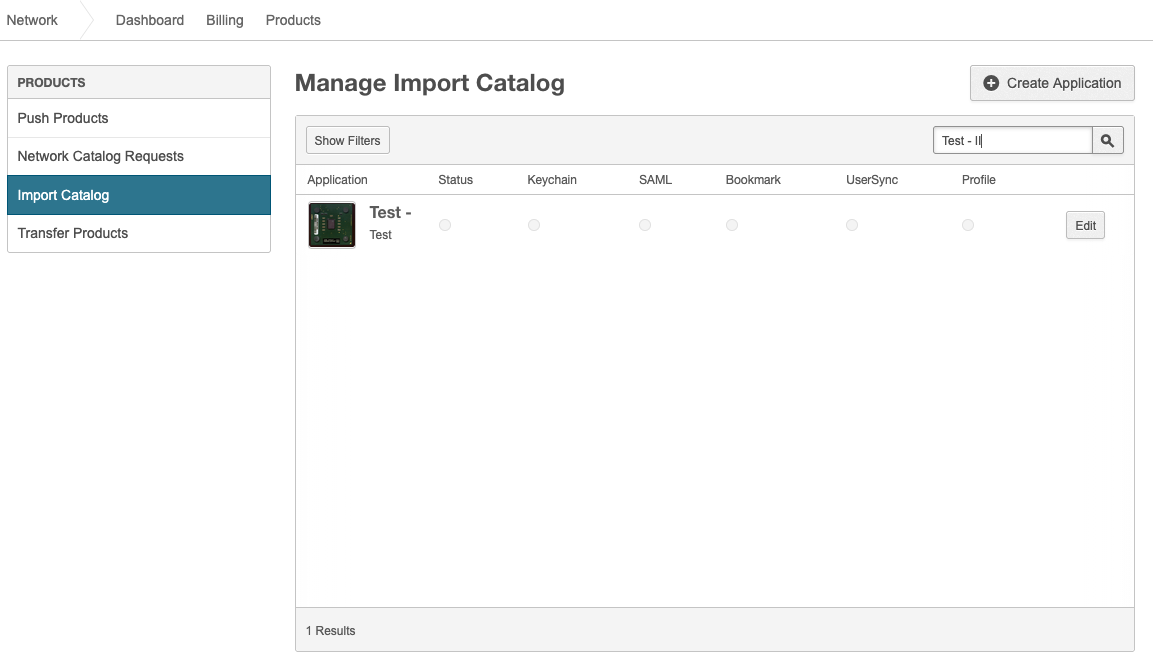
Import Catalog
Use Import Catalog to manage applications imported into your network catalog and review their integration status.
To manage imported applications
- Go to Manage > Network > Products, then select Import Catalog in the left navigation pane. The Manage Import Catalog page opens.
- (Optional) Click Show Filters or use the search field to locate an application.
- Review the application list. The table displays the application name and status for Keychain, SAML, Bookmark, UserSync, and Profile.
- To add an application, click Create Application and complete the required fields.
- To update an existing application, click Edit in the application row.
Sample Catalog
Sample Catalog provides access to sample catalog applications for AppDirect base partner marketplaces.
To access the sample catalog
- Go to Manage > Network > Products, then select Sample Catalog in the left navigation pane.
- Browse or search for sample applications as needed.
Transfer Products
Use Transfer Products to transfer products between marketplaces in your network hierarchy. You can transfer products only within the network hierarchy that you manage.
To transfer a product
- Go to Manage > Network > Products, then select Transfer Products in the left navigation pane.
- Select the source catalog or marketplace.
- Search for the product to transfer.
- Select the destination marketplace within your network hierarchy.
- Complete the transfer and confirm the result.
📝 Note: You cannot transfer products outside your owned network hierarchy.
Was this page helpful?
Tell us more…
Help us improve our content. Responses are anonymous.
Thanks
We appreciate your feedback!