AppInsights dashboard for Resellers and Reseller Managers
Resellers and Reseller Managers use AppInsights as the operational dashboard for orders, quotes, commissions, and subscriptions. It centralizes metrics that were not previously available to these roles without Marketplace Manager access.
- Resellers review operational metrics for their reseller company.
- Reseller Managers use the same dashboards with visibility across managed reseller companies to track order volume, order value, quotes, and subscription health for managed accounts.
Widgets are read-only and follow existing data-access permissions.
The home Reseller dashboard may still show portal elements such as events, quick links, featured apps, and optional quote widgets (Quoting Pipeline, Priority Quotes, and so on) when your marketplace has them enabled. Those home-page widgets support day-to-day navigation and quote actions; trend and status analytics for orders, quotes, and subscriptions are in AppInsights.
Before you begin
To open AppInsights, you must hold an eligible Marketplace role. The following roles have default access:
- Reseller
- Reseller Manager
- Reseller + Company Admin
AppInsights is a native Marketplace capability. You do not need the AppInsights product assigned to your user. Access is controlled through your Marketplace role.
Availability and widget layout can differ between marketplaces. Contact your AppDirect technical representative if you are unsure whether this dashboard is enabled for your marketplace.
Open the dashboard
- Sign in to the marketplace.
- Click the AppInsights icon in the Marketplace top navigation.
- Open the reseller operational dashboard in AppInsights.
📝 Note: The AppInsights icon appears in the Marketplace top navigation when the marketplace uses the universal header with the latest theme. In marketplaces that use the universal header with an older theme, the icon may not be displayed. Users with an eligible role can still access AppInsights at
/insights/appuntil the marketplace navigation theme is updated.
For more information about native AppInsights access, see Integrating AppInsights as a native capability.
As with other AppInsights dashboards, you can apply filters and drill down from a chart to review underlying data where supported.
What you can review
Widgets are grouped into dashboards. The dashboards you see depend on your marketplace configuration and role permissions. Reseller Managers see data for the reseller companies and accounts they manage.
Commissions
| Widget | What it shows |
|---|---|
| Commissions | Total commission amounts per month for the past 12 months. |
Orders, quotes, and subscriptions
| Widget | What it shows |
|---|---|
| Quotes by Status | How quotes are distributed across statuses. |
| Pending Approval Quotes by Age | Quotes awaiting approval, grouped by how long they have been pending. |
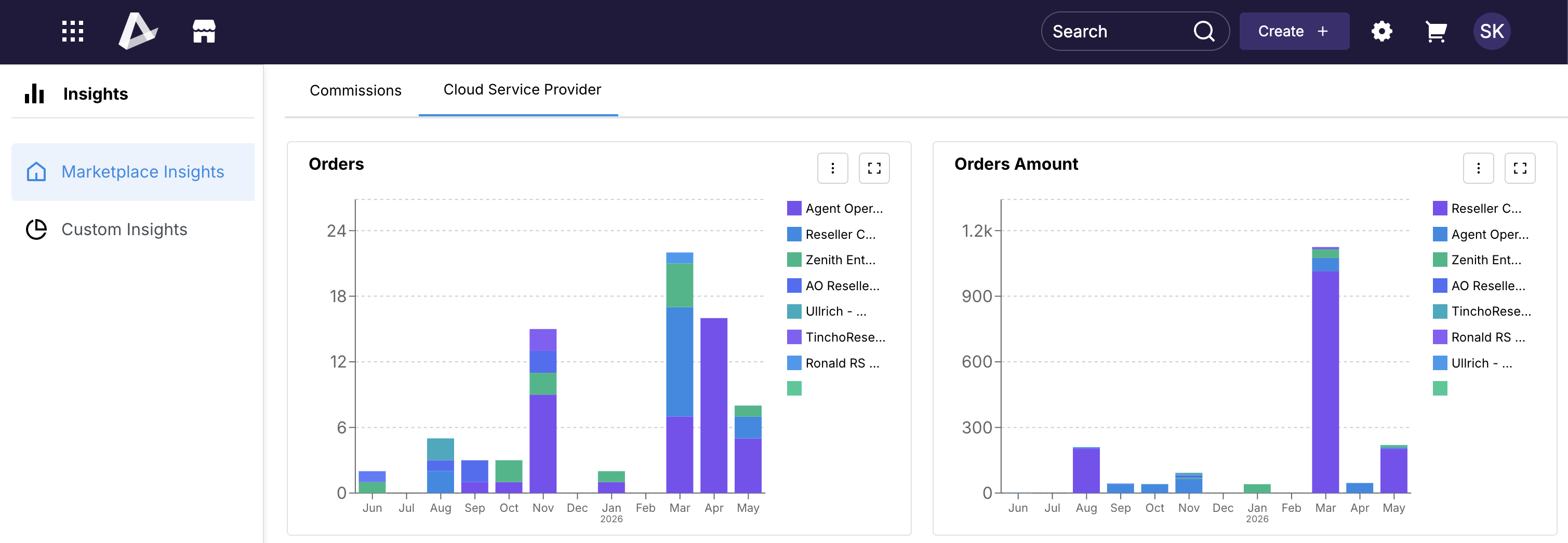
| Orders | Number of orders per month for the past 12 months. |
| Orders Amount | Order amounts per month for the past 12 months. |
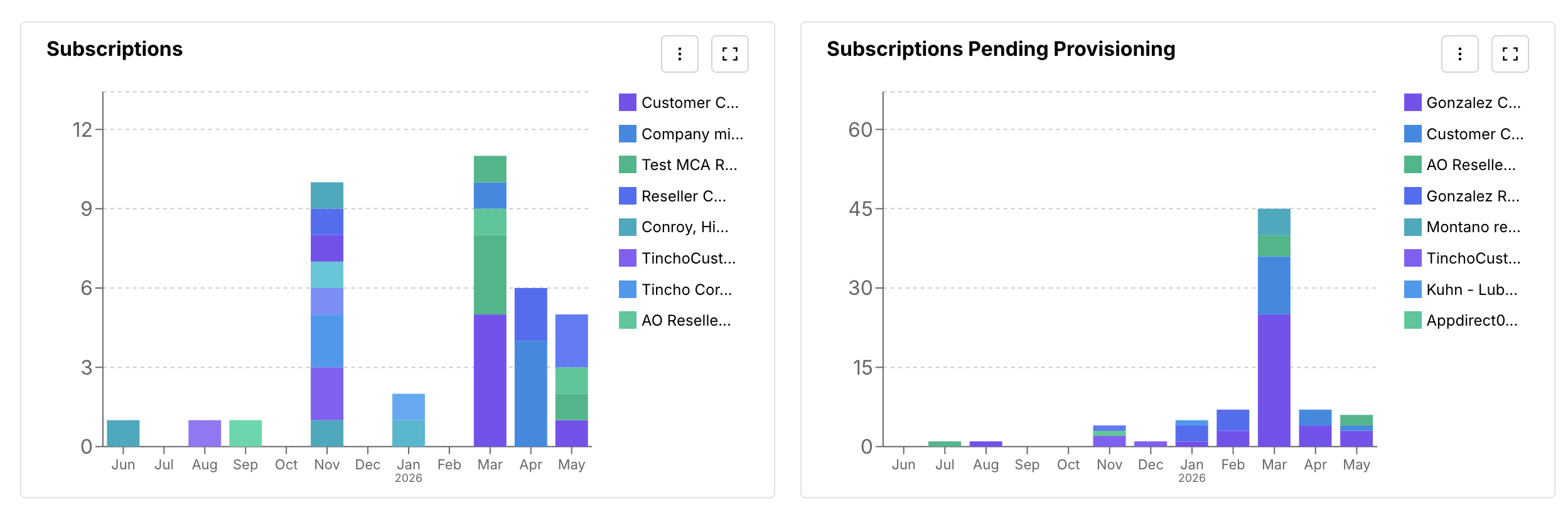
| Subscriptions | Newly created subscriptions per month for the past 12 months. |
| Subscriptions Pending Provisioning | Subscriptions still in an initialized (pending provisioning) state per month for the past 12 months. |
Use the data in your workflow
Resellers
- Quote follow-up — Use Quotes by Status and Pending Approval Quotes by Age in AppInsights to see pipeline health. To open or edit a specific quote, use the Quotes list or optional widgets on the home Reseller dashboard (Quoting Pipeline, Unfinished Quotes, or Priority Quotes) when they are enabled.
- Order and subscription health — Use order and subscription widgets to spot changes in volume over time. Drill down in AppInsights when you need row-level detail.
- Commission activity — Use Commissions to monitor commission-related volume alongside quote and order trends.
Reseller Managers
- Pipeline oversight — Use Quotes by Status and Pending Approval Quotes by Age to review quote pipeline health across managed reseller companies. To work on a specific quote, use the Quotes list or View and manage quotes.
- Order and subscription health — Use order and subscription widgets to spot changes in volume over time across managed accounts. Drill down in AppInsights when you need row-level detail.
- Commission activity — Use Commissions to monitor commission-related volume alongside quote and order trends for the organizations you oversee.
📝 Note: AppInsights data is refreshed on the standard AppInsights schedule (typically through the previous day). Widget counts may not match real-time lists on other marketplace pages.
Was this page helpful?
Tell us more…
Help us improve our content. Responses are anonymous.
Thanks
We appreciate your feedback!