Pricing plan search in Quotes
Moderate Upgrade
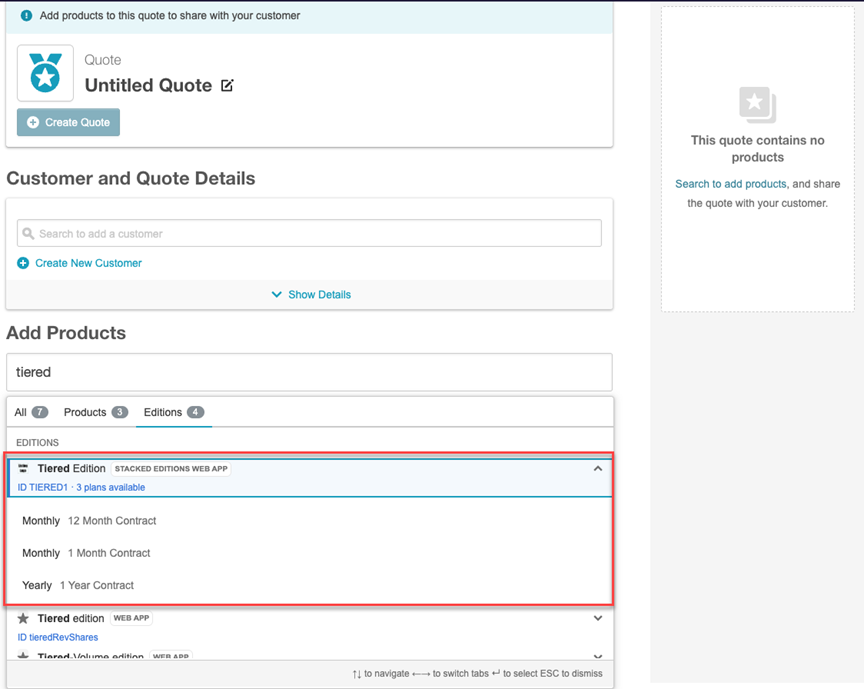
With this release, users can now view and select specific pricing plans directly within the edition search experience before adding a product to a quote. Users can view and select specific pricing plans including billing frequency directly in the edition search interface when building quotes. On the Instant Quote Creation and Quote Details pages, expanding an edition row in search opens an accordion that lists pricing plans, including billing frequency and contract term. Pricing plans appear only on edition rows; they do not appear on product rows. Previously, selecting an edition applied the first available pricing plan by default, and users had to open item configuration to change the plan.
Key highlights
- Users can select a pricing plan before adding a product to a quote by expanding an edition row in product and edition search.
- Pricing plans appear only when an edition row is expanded. They do not appear on product rows.
- The updated experience displays:
- Billing frequency
- Contract term
- The product search UI uses an accordion layout for edition results to support multiple pricing plan options.
- A new button Add to Quote allows users to choose the required billing frequency and contract term within the expanded edition view.
- Users can still change the selected pricing plan later using Edit on the quote details page.
UI updates
- Instant Quote Creation > Product Search — A drop down on edition results expands an accordion to select a pricing plan before adding the product to the quote.
- Quote Details > Product Search — A drop down on edition results expands an accordion to retrieve and select a pricing plan before adding the product to the quote.
Feature enablement
This feature is enabled by default.
Setting enablement
No setting enablement is required.
Documentation
Refer to the following:
Was this page helpful?
Tell us more…
Help us improve our content. Responses are anonymous.
Thanks
We appreciate your feedback!