Collapsible tier breakdown on pricing summary in Subscription Update v2
Moderate Upgrade
❗ Important: This feature is currently in Early Availability (EA) status. For more information on feature status, see Product lifecycle phases.
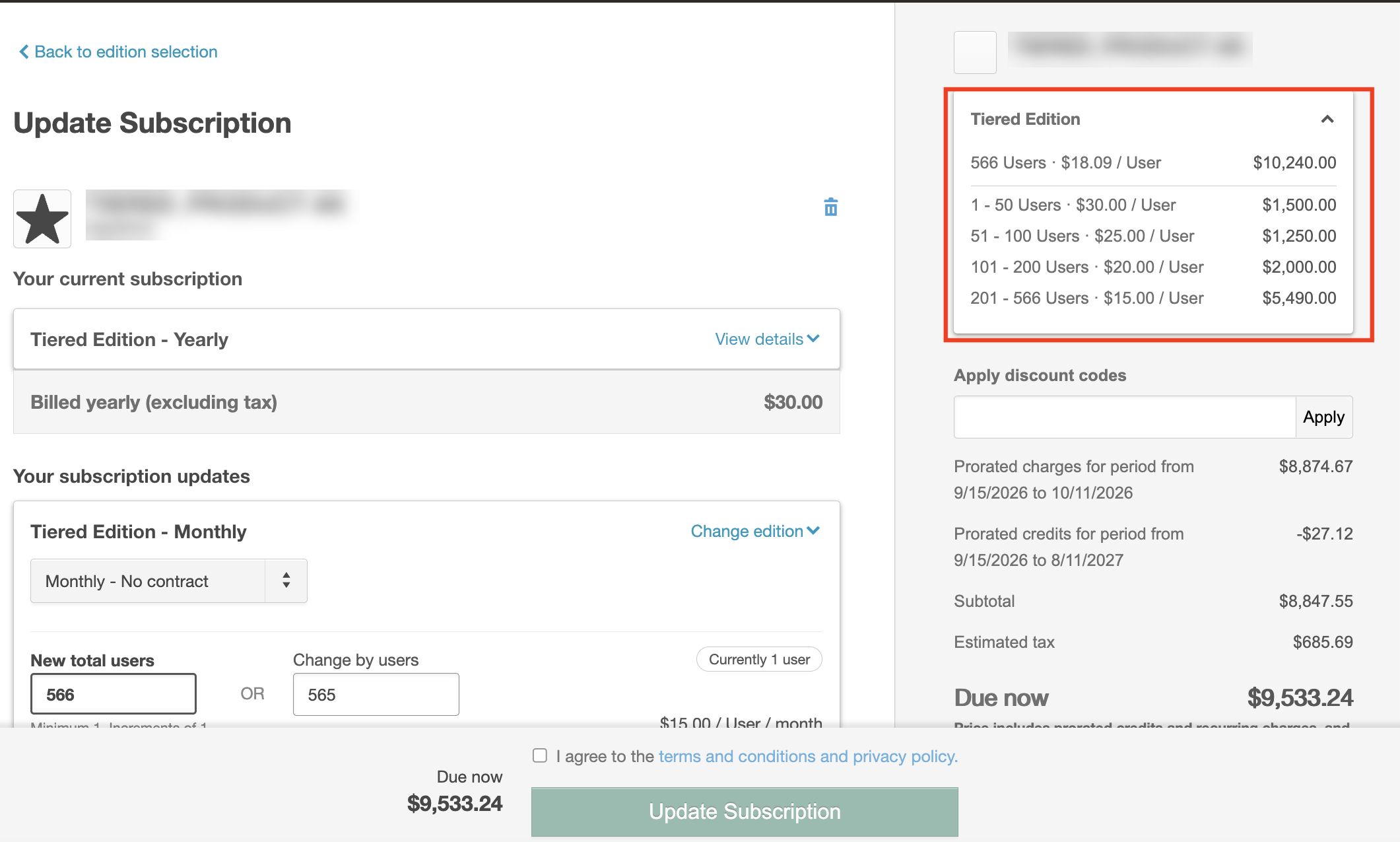
The Subscription Update v2 checkout pane now collapses tiered pricing details by default to simplify the pricing summary and emphasize decision-relevant information such as discounts and taxes. Customers can expand the pricing summary to view the full tier breakdown, with the applicable tier for the selected quantity clearly highlighted. This update applies to self-serve checkout flows for tiered-pricing SKUs. This update specifically applies to self-serve checkout flows for tiered-pricing SKUs.
Key highlights
- Tiered pricing details are now collapsed by default in the Subscription Update v2 self-serve checkout pricing summary.
- The collapsed summary row displays:
- Quantity
- Weighted-average per-unit price
- Total cost
- The expanded breakdown highlights the applicable tier for the current quantity.
- The collapsed or expanded state persists throughout the active session for the subscription.
- Flat-price (non-tiered) SKUs are excluded and continue to render without a collapsible header.
- Backend pricing computation and GraphQL API contracts are unchanged.
UI updates
Subscription Update v2 self-serve > right-pane Pricing summary
- Collapsible plan header row (collapsed by default; expandable to show the full tier breakdown).
- Single summary row showing quantity, weighted-average per-unit price, and total cost when collapsed.
- Full tier breakdown with highlighted applicable tier when expanded.
Feature enablement
No feature enablement is required.
Setting enablement
No setting enablement is required.
Documentation
Documentation will be updated with the release.
Was this page helpful?
Tell us more…
Help us improve our content. Responses are anonymous.
Thanks
We appreciate your feedback!