Improved messaging for credit limits in Checkout V2
Minor Upgrade
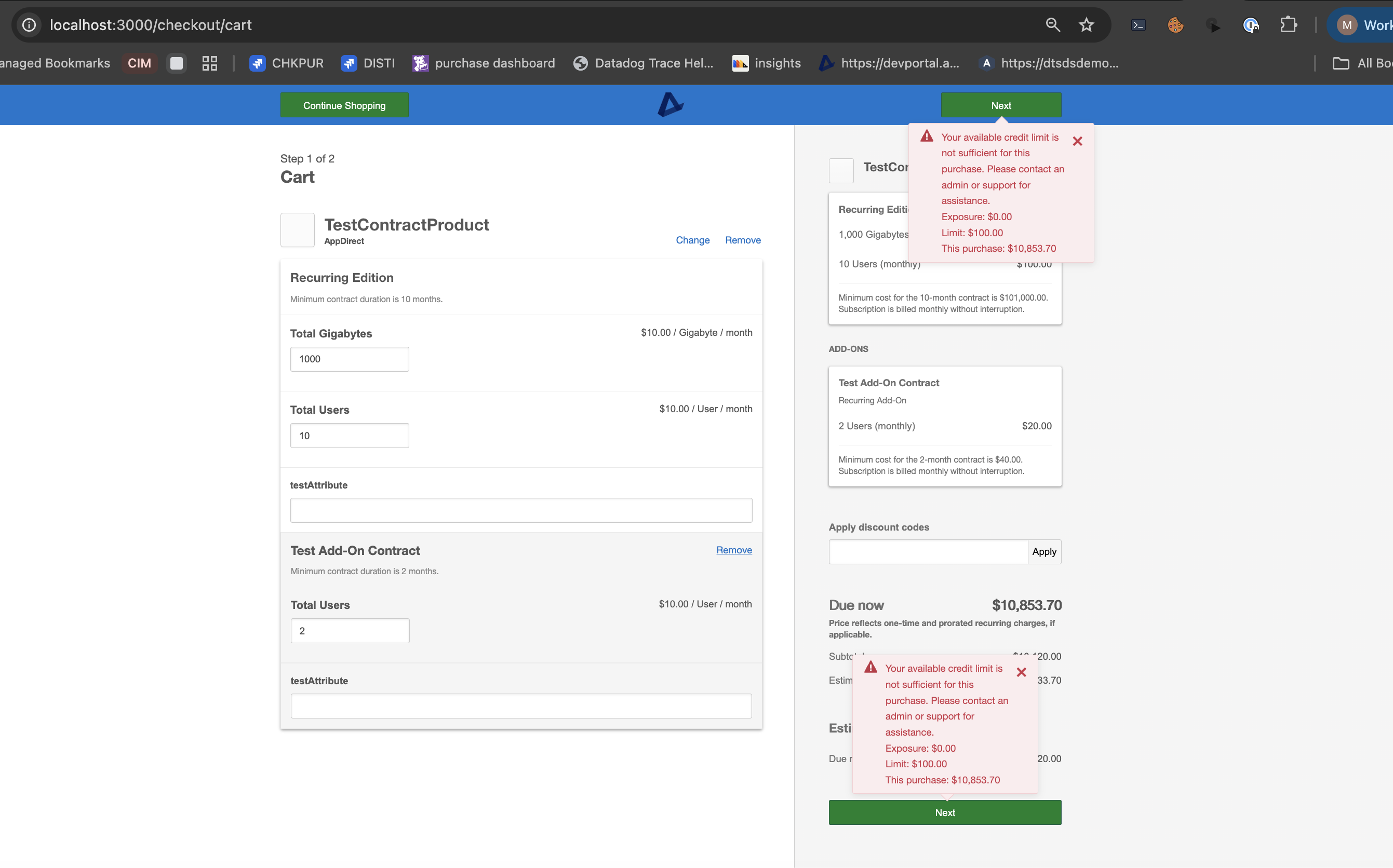
When a purchase is blocked because it exceeds a company’s credit limit, Checkout V2 now shows a credit limit–specific message with the amounts that matter: credit used, credit limit, and the current order total. Buyers can see why checkout is blocked and by how much, so they can reduce the order or ask an administrator for a specific limit increase.
Previously, a credit limit block appeared with credit-limit error wording and no amounts, which made it harder to know why control was blocking the purchase or how far over the limit the order was.
📝 Note: Spend limit failures continue to use the existing spend limit message. Opportunity credit limit messaging is unchanged.
Feature enablement
This feature is enabled by default for marketplaces that use credit limit validation at checkout.
Setting enablement
No setting enablement is required. The message appears when company credit limits are configured and a purchase is blocked by the credit limit.
Documentation
Documentation will be updated with the release. For more information on credit limits and spend limits, see:
Was this page helpful?
Tell us more…
Help us improve our content. Responses are anonymous.
Thanks
We appreciate your feedback!