Credit limit validation in Checkout V2
Minor Upgrade
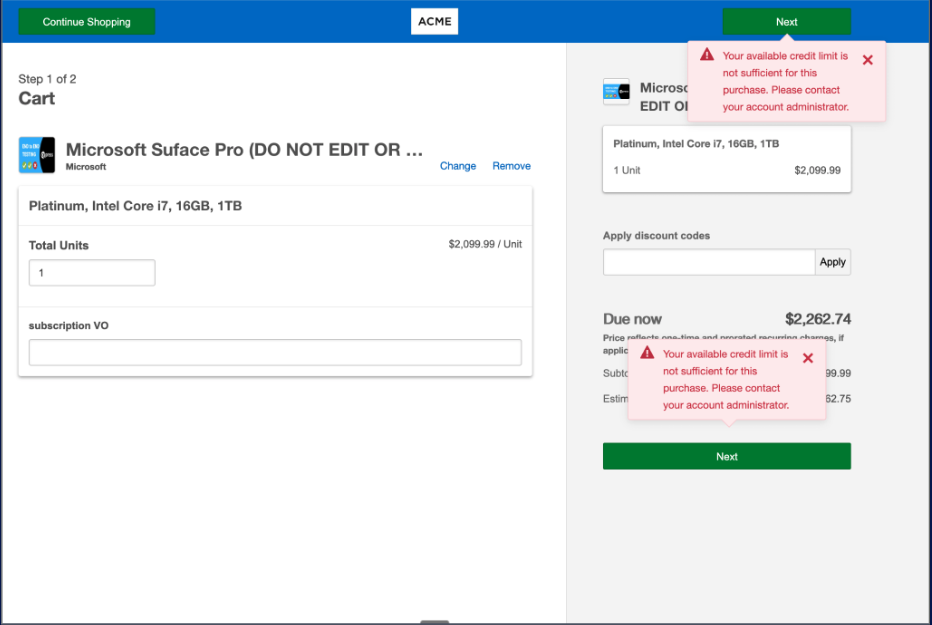
Checkout V2 can now enforce credit limits at order submission. When a customer proceeds with a purchase using Checkout V2, the platform validates the cart against the applicable credit limit configured at the marketplace or company level. If an order exceeds the available credit, checkout is blocked and the customer sees an error message.
Validation reuses the same error-handling framework as spend limits and other purchase restrictions so the purchase experience stays consistent.
Credit limit and spend limit are independent. Where both are configured, they can apply at the same time but they measure different things:
- Credit limit caps how much unpaid balance a company or marketplace can carry.
- Spend limits govern how much a company is permitted to spend over the configured daily or 30-day windows.
Key highlights
-
Credit limit validation runs automatically in Checkout V2 whenever a credit limit is configured.
-
The cart and outstanding credit utilization are evaluated at checkout submission so buyers see an up-to-date decision at the moment of purchase.
-
Marketplace and company configuration: Credit limits can be set at the marketplace level and/or at the company level. If both a spend limit and a credit limit are configured, the credit limit message is shown first. Checkout V2 presents one buyer-facing validation message at a time; after the buyer resolves the credit limit issue, spend limit validation runs again as applicable.
📝 Note: For how metered usage is reflected in credit limit calculations, see Credit limit validation now includes metered usage.
Feature enablement
No feature enablement is required. Checkout V2 credit limit validation activates automatically when the feature is configured in settings. See the Setting enablement section below.
Setting enablement
To enable credit limit:
- Go to Settings > Billing Functionality > Purchase Restrictions > Credit limit.
- Configure marketplace and/or company-level limits as applicable.
Documentation
Documentation will be updated with the release.
Was this page helpful?
Tell us more…
Help us improve our content. Responses are anonymous.
Thanks
We appreciate your feedback!