Credit Limit management
Major Upgrade
❗ Important: This feature is currently in Early Availability (EA) status. For more information on feature status, see Product lifecycle phases.
AppDirect introduces the Credit Limit feature to provide marketplaces with sophisticated financial guardrails. This feature aligns with industry-standard postpaid models, ensuring that customers pay their outstanding balances to continue enjoying the benefits of their services.
The Credit Limit allows partners to configure exactly how much credit a customer can have at any given point in time. Unlike other mechanisms, this does not operate on a rolling 30-day window; instead, it is a dynamic cap based on real-time debt. As a customer pays their outstanding invoices, their available credit is instantly restored.
Key highlights
-
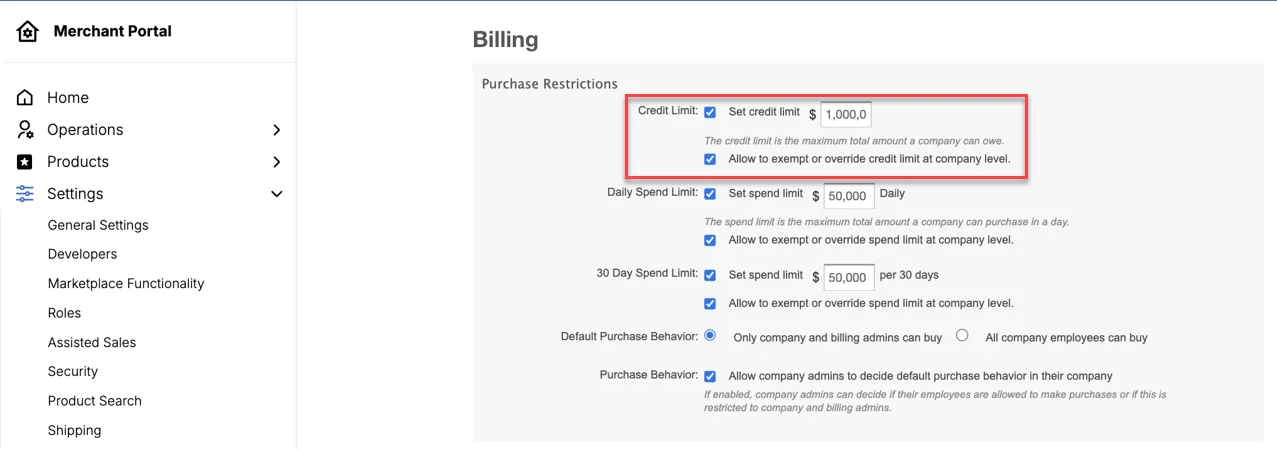
Marketplace control and overrides: A new setting allows you to turn the Credit Limit feature on or off. You can establish a global default limit via Settings > Billing Functionality or apply company-specific overrides, including granting Unlimited Credit to trusted partners.
-
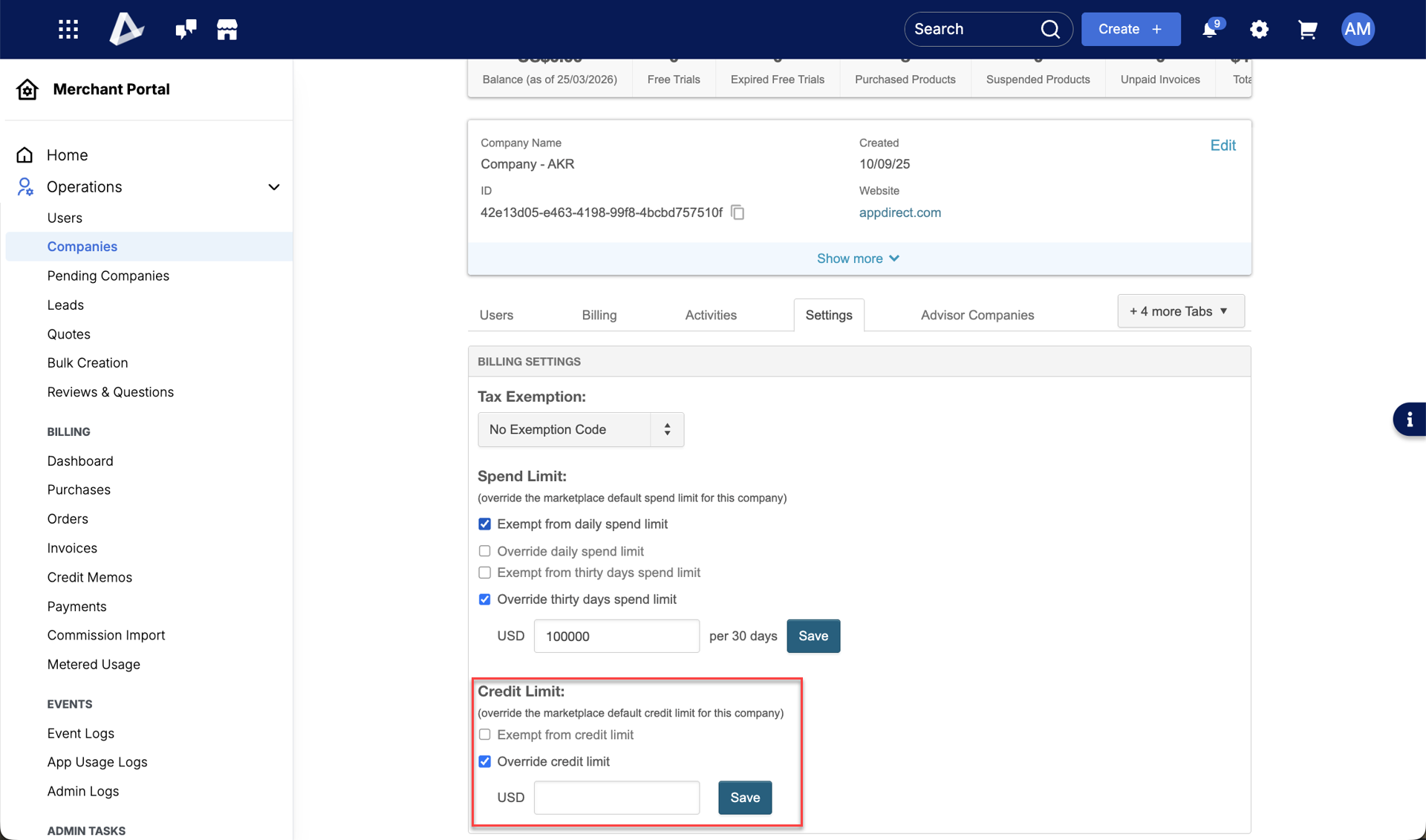
Company-specific overrides: Account Managers can navigate to an individual company's settings to increase, decrease, or completely override limits for that specific account.
-
Unlimited credit: Within company settings, you can fully exempt specific, trusted companies from the feature, granting them unlimited credit.
-
Checkout and opportunities: Purchases are blocked at the point of sale if the order value causes the customer to exceed their configured limit.
-
Renewals and upgrades: Planned renewals will fail if the limit is 100% utilized, and upgrades are blocked if the new cost exceeds the remaining credit.
📝 Note: A notification is displayed if purchases cross the credit limit, informing the user to pay the outstanding amount to continue with the purchase.
-
Carts, quotes, and downgrades remain unrestricted, as they either represent intent without immediate debt or actively reduce the marketplace's financial exposure.
Interaction with Spend Limits
Both limit types currently coexist in the system. The system evaluates the Credit Limit first, followed by the Spend Limit. This ensures maximum protection; however, it means that even if a customer has available credit (or recently paid their dues), they may still be blocked if they exceed their configured rolling spend limit.
Best practice
We recommend setting a lower default limit for new companies to minimize initial risk. For existing customers, you can set a higher default limit and update their specific limits in bulk based on their payment history.
Marketplaces can update existing customer limits in bulk to ensure a smooth transition into the EA phase.
In this initial phase, credit utilization percentages are not yet visible to end customers or managers on their dashboards; enforcement occurs at the point of purchase.
Feature enablement
This feature is not enabled by default. Contact your AppDirect technical representative to request it.
Setting enablement
Manage > Marketplace > Settings > BILLING SETTINGS | Billing Functionality > Purchase Restrictions
Documentation
Refer to the following:
Was this page helpful?
Tell us more…
Help us improve our content. Responses are anonymous.
Thanks
We appreciate your feedback!