Introducing a more powerful Create Product experience
Moderate Upgrade
❗ Important: This feature is currently in the Preview status.
Product creation today happens on two distinct Create Product pages: one for Enterprise or Network edition customers, and another for Starter or Professional edition customers. The Enterprise version was designed to give maximum flexibility to the Marketplace Manager, but at the expense of clarity for what each setting does. The Starter and Professional version was simplified, but presented options in ways that were not clear or even conceptually correct.
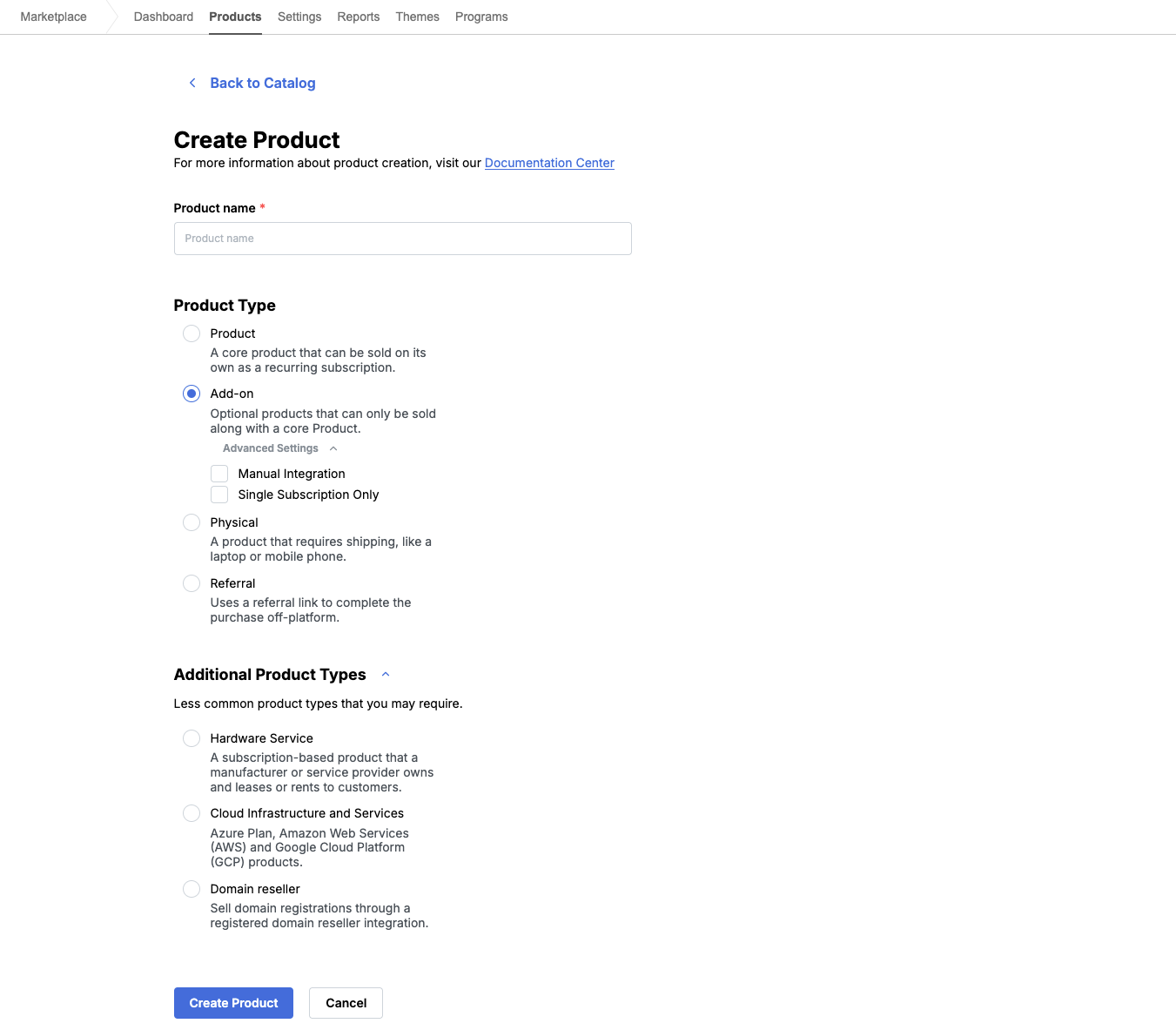
The new Create Product experience balances flexibility and usability by presenting options based on feedback and data collected for how Marketplace Managers and Developers use the marketplace. Four Primary product types appear by default to support the most common product creation needs. Marketplace Managers and Developers select the desired product type and outcome first, and additional options appear when they apply that selection. A separate product type and integration type choice is no longer required to create a product.
The new interface also exposes additional product types to Marketplace Managers. These types were previously available only to Superusers. Marketplace Managers can optionally enable less common product types and control whether Developers can use them. Existing marketplace product type settings are preserved with no migration required.
Supported product types
Primary types (always available)
| Type | Description |
|---|---|
| Product | Standard web application |
| Physical Product | Tangible goods |
| Add-on | Sold alongside a core product |
| Referral | Uses a referral link instead of full integration |
Additional product types
Marketplace Managers can enable or disable each type below. When at least one is enabled, types appear in a collapsible Additional Product Types section.
| Type | Description |
|---|---|
| Download | Electronic file delivery |
| Cloud Infrastructure and Services | Offerings such as Azure, AWS, or GCP |
| Hardware Service | Subscription-based hardware leasing or rental |
| Domain Provider | Domain registration and reselling |
| Imported Apps (SSO) | SSO without billing integration (renamed from Import Apps) |
For web-app based types (Product, Add-on, Referral, and Imported Apps (SSO)), an Advanced Settings area offers Manual Integration and Stackability, where applicable. Hardware Service shows stackability options when that type is selected.
📝 Note: The following types are no longer available for new products: Training Video, legacy domain registration, static products, external applications, and the deprecated Stacked Editions Web App type. Stackability is now a setting on applicable product types.
UI updates
- Primary types appear first on the Create Product page.
- The Additional Product Types section starts collapsed and appears only when at least one additional type is enabled for the marketplace.
- Advanced Settings and stackability options display based on the selected product type.
- Short tooltips explain each product type and option.
- Create Product and Cancel remain visible at the bottom of the page while scrolling.
- If required information is missing, inline messages appear instead of disabling Create Product.
- After a product is created successfully, users go directly to the product setup page to continue configuration.
Feature enablement
This feature is not enabled by default. Existing creation flows remain until the feature is enabled for your marketplace. Rollout is phased. Contact your AppDirect technical representative to request it.
Setting enablement
No setting enablement is required.
Documentation
Documentation will be updated with the release.
Was this page helpful?
Tell us more…
Help us improve our content. Responses are anonymous.
Thanks
We appreciate your feedback!