Invoice and Credit Memo prefix customization
Major Upgrade
❗ Important: This feature is currently in the Early Availability (EA) status.
With this release, administrators can now configure document numbering prefixes for invoices and credit memos directly via the UI. Previously, prefix configuration was an API-only workflow, and credit memos could not have distinct prefixes even when credit memo functionality was enabled.
Key highlights
- UI-driven prefix configuration: Set unique or identical prefixes for invoices and credit memos directly in the user interface.
- Enhanced credit memo support: Credit memos can now have distinct prefixes, even for marketplaces with credit memo functionality enabled.
- API support maintained: Prefix configuration remains available via API.
UI updates
A new Document numbering section has been added to the Invoice & Credit Memo page. This intuitive interface, which supports dynamic variables, allows administrators to easily configure prefix values for both invoices and credit memos.
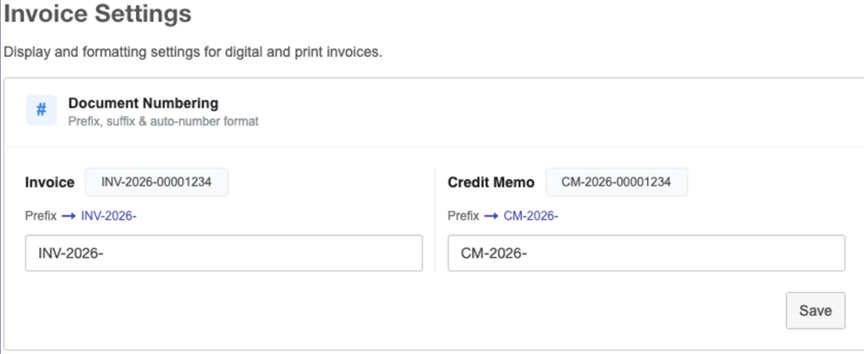
To improve consistency and standardize the prefix configuration experience, the following updates have been implemented:
- New validation rules prohibit spaces and restrict special characters to hyphens (-) and slashes (/).
- Several billing settings pages have been renamed by removing the word "settings": Invoice settings → Invoice & Credit Memo, Tax settings → Tax, and Revenue shares settings → Revenue share.
This release significantly enhances the administrator experience by bringing invoice and credit memo prefix customization to the UI, eliminating the need for API-only workflows and providing greater flexibility and control over invoice and credit memo numbering.
Feature enablement
This feature is not enabled by default. Contact your AppDirect technical representative to request it.
Setting enablement
No setting enablement is required.
Documentation
Documentation will be updated when the feature goes GA.
Was this page helpful?
Tell us more…
Help us improve our content. Responses are anonymous.
Thanks
We appreciate your feedback!