Resolving end-of-term actionType discrepancies in the Microsoft Sync Tool
Moderate Upgrade
Important: This feature is currently in Early Availability (EA) status.
The Microsoft Sync Tool now lets Marketplace Managers resolve end-of-term actionType discrepancies for Microsoft NCE subscriptions directly from the Sync Tool. When a SCHEDULED_CHANGE_ACTION_TYPE_MISMATCH is detected between the marketplace and Microsoft Partner Center, managers can trigger Sync to align the renewal policy (Cancel or Extended Service Term) without leaving the tool.
Previously, the Sync Tool could detect these mismatches but could not resolve them. Marketplace Managers had to update Microsoft Partner Center manually. This release adds a UI-driven sync workflow for ongoing end-of-term discrepancies and supports the Extended Service Term (EST) programme.
Note: Background auto-correction to Cancel (see Automatic correction of Microsoft Extended Service Term (EST)) still applies for eligible cases. Use Sync Tool sync when partner intent for EST versus Cancel must be applied at contract end.
Changes in the UI
- ActionType discrepancies appear as syncable rows in the Sync Tool. On the Subscriptions with Discrepancies tab, use the Discrepancy type filter and select SCHEDULED_CHANGE_ACTION_TYPE_MISMATCH.
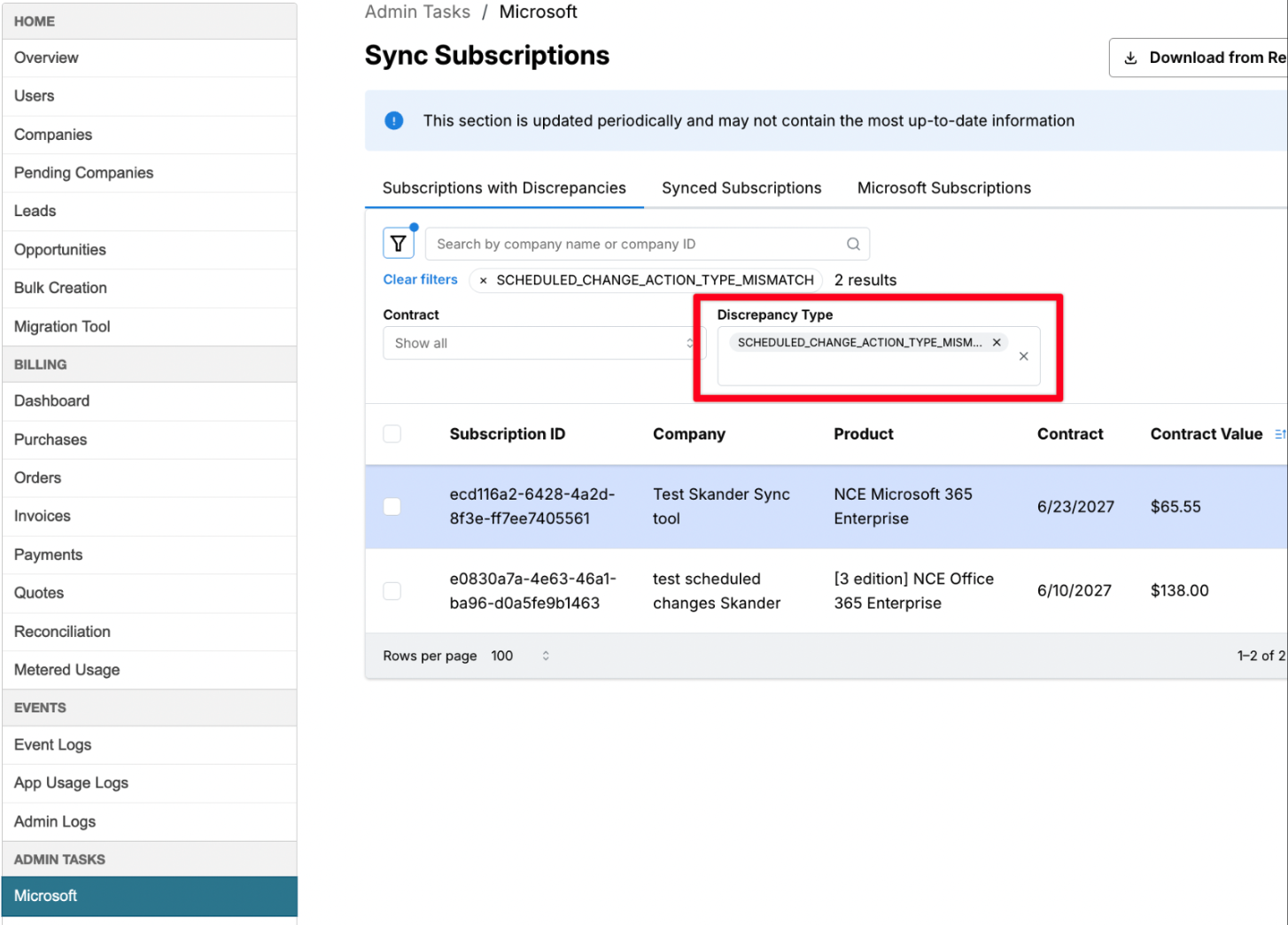
- The discrepancy drawer shows side-by-side actionType values when enabled.
- Marketplace Managers trigger Sync from the discrepancy view. Bulk sync is supported with per-row outcomes.
- A tooltip warns that renewal policy aligns at contract end and may combine with a scheduled quantity change.
- Synced actions are recorded in the Synced Subscriptions tab.
To sync an end-of-term actionType discrepancy (individual),
- Go to Manage > Marketplace | Admin Tasks > Microsoft to open the Sync Subscriptions page.
- On the Subscriptions with Discrepancies tab, use the Discrepancy type filter and select SCHEDULED_CHANGE_ACTION_TYPE_MISMATCH.
- Select a subscription to review marketplace and Partner Center actionType values in the detail panel.
- Click Sync Subscription, type CONFIRM, and click Accept to apply the correction.
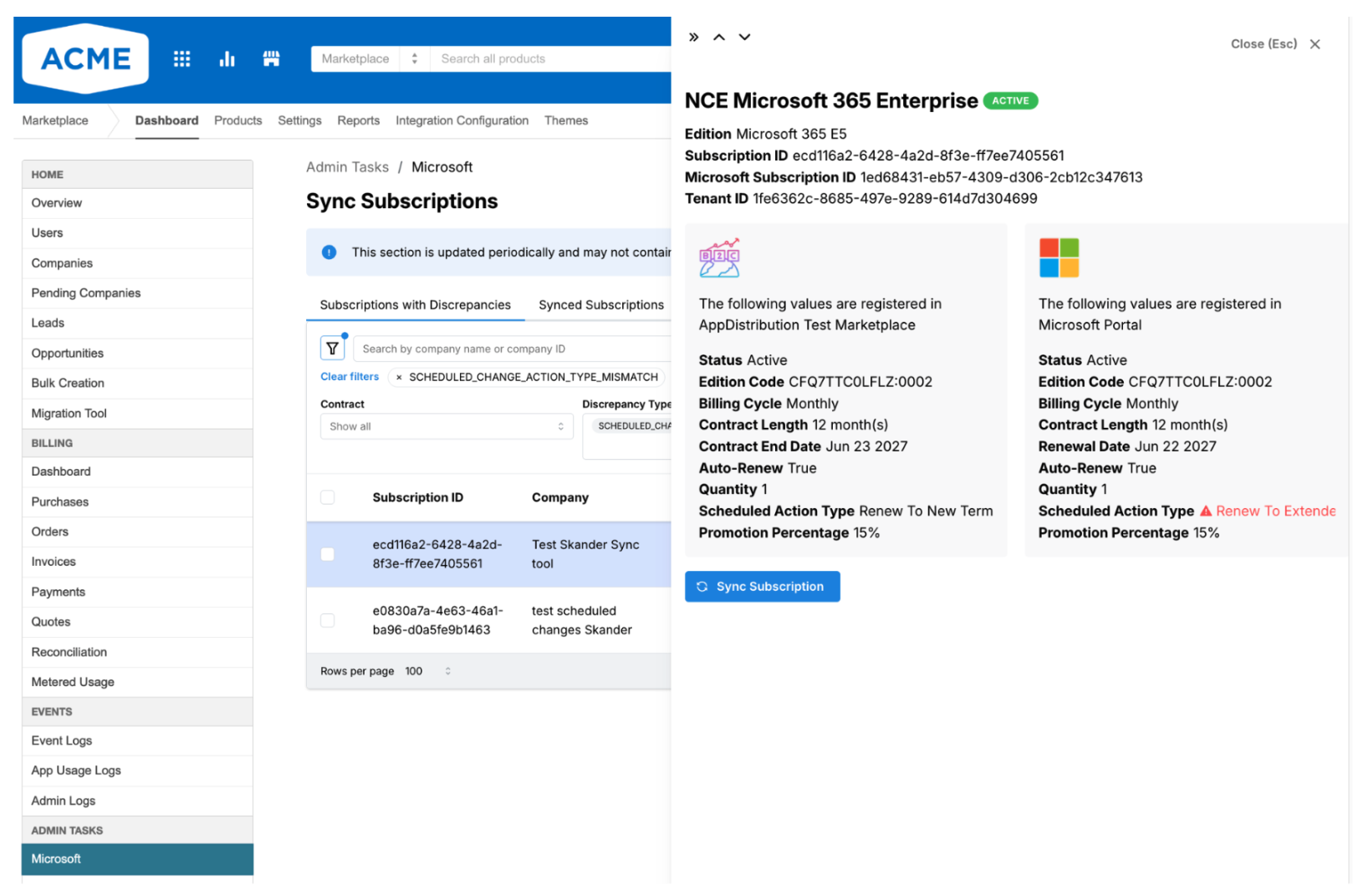
Bulk sync
End-of-term actionType discrepancies can be synced in bulk. Review selected subscriptions before you proceed and verify per-row outcomes after sync completes.
Note: Syncing actionType does not adjust past invoices, issue credits, or notify end customers. When a pending scheduled quantity or promotion change also exists at end of term, sync may run in two steps. Verify the outcome in Synced Subscriptions.
Feature enablement
This feature is not enabled by default. Contact your AppDirect technical representative to request it.
Setting enablement
No setting enablement is required.
Documentation
Refer to Microsoft Sync UI.
Was this page helpful?
Tell us more…
Help us improve our content. Responses are anonymous.
Thanks
We appreciate your feedback!