New sync settings for Microsoft contract term end dates
Minor Upgrade
We are introducing new Marketplace Manager settings on the Sync Settings page to control the auto-sync of contract term end dates for Microsoft NCE subscriptions. When enabled, these settings automatically align the marketplace contract term end date with the value in Microsoft Partner Center during subscription lifecycle events. This prevents drift that can lead to billing and service timeline mismatches.
📝 Note: This feature was originally launched in Early Availability (EA) as part of release 652 (September 2024). It was later announced as an upcoming General Availability (GA) release in 715 release (December 2025). Based on partner feedback, we have revised the release strategy and are offering it now as opt-in settings instead.
There are three settings, one for each subscription lifecycle event:
- New purchase
- Subscription updates
- Contract renewal
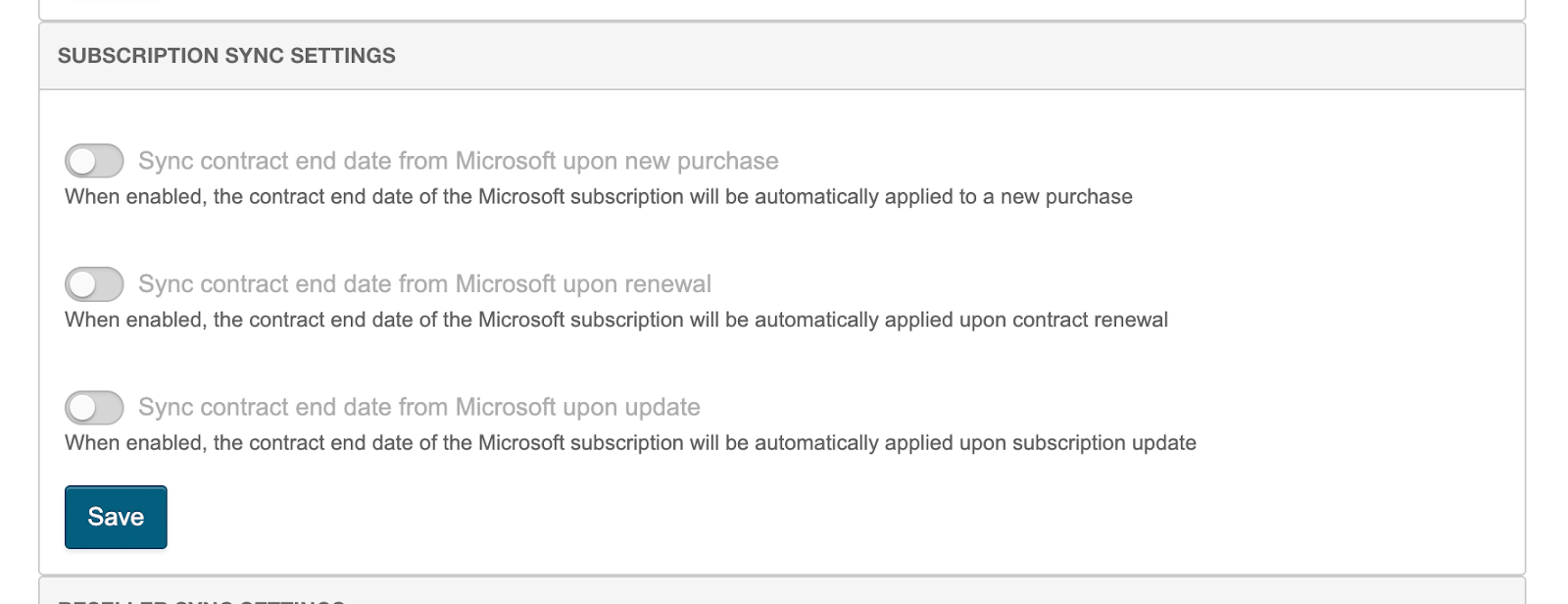
When enabled, Service End and Billing End dates may update after the configured lifecycle events. Customers may see small invoice adjustments that reflect corrected contract dates. Updates occur automatically and do not generate UI notifications. We recommend enabling all three sync settings to maintain alignment; new marketplaces have them enabled by default, while existing marketplaces do not.
Feature enablement
This feature is not enabled by default. Contact your AppDirect technical representative to request it.
Setting enablement
No setting enablement is required.
Documentation
Documentation will be updated with the release.
Was this page helpful?
Tell us more…
Help us improve our content. Responses are anonymous.
Thanks
We appreciate your feedback!