Enhanced Product Uploader experience
Major Upgrade
Product Uploader is enhanced with a new interface to help users manage bulk upload activities more efficiently. However, the users have an option to choose between the new interface and the existing experience to suit their workflow.
The new experience provides the users with:
- Enhanced Activity logs:
- Allows you to filter and manage upload tasks more effectively.
- Ability to perform appropriate activities from the Activity log, For example: Users can publish staging catalog changes directly from the activity log without initiating a separate workflow.
- Improved Create Catalog experience:
- Along with the existing features of allowing users to download a specific set of products, new experience now includes:
- The ability for users to review the uploaded product data.
- Validation of the product data to check the mandatory fields, field type mismatch.
- The ability to add the product to either staging or production catalog without a need to additionally publish products through separate workflows.
- Along with the existing features of allowing users to download a specific set of products, new experience now includes:
- Updated Publish Catalog flow:
- Ability for users to publish from Activity Logs.
- Capability to manage the Marketplace Settings as part of Publish flow.
UI changes:
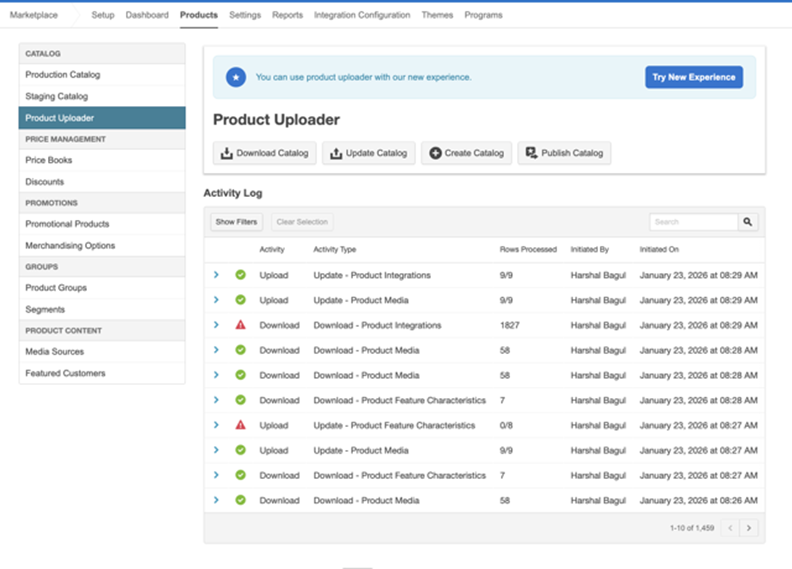
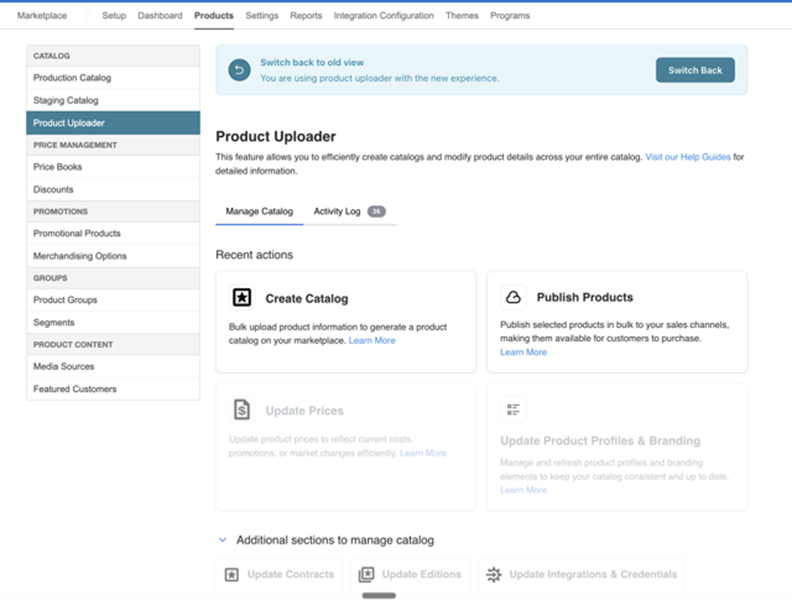
The Product Uploader UI is enhanced to allow the users to try the new functionalities for specific tasks while switching back to the existing UI whenever necessary.
Existing UI - You can click on the Try New Experience button to move to the new UI.
New UI: - You can click the Switch Back button to go back to the current UI.
Feature enablement
This feature is not enabled by default. Contact your AppDirect technical representative to request it.
Setting enablement
No setting enablement is required.
Documentation
Documentation will be updated with the release.
Was this page helpful?
Tell us more…
Help us improve our content. Responses are anonymous.
Thanks
We appreciate your feedback!